Traffic & Transit
I-80 Six Bridges Project: Caltrans To Host Public Meeting Online
The work will take place one bridge at a time and requires a four-month closure of each bridge, starting with Springs Road.


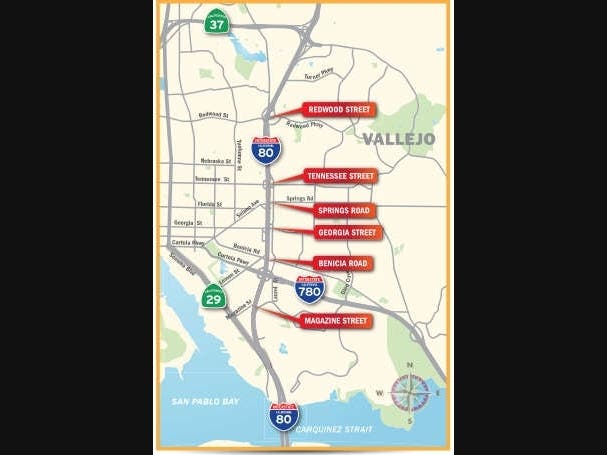
VALLEJO, CA — Caltrans is hosting a public meeting soon about the I-80 Six Bridges project in Vallejo. The project is to raise the vertical clearance on six bridges that cross over Interstate Highway 80 in the Solano County city of Vallejo, just north of the Carquinez Bridge: the Magazine Street, Benicia Road, Georgia Street, Springs Road, Tennessee Street and Redwood Street bridges.
Caltrans will elevate the bridges to the latest standard vertical clearance height of 16 feet 6 inches to accommodate large commercial permit vehicles, so they can continue to safely move freight through I-80, a major freight corridor connecting San Francisco Bay Area to the regions in the north, according to the Caltrans web page for the project.
The work will take place one bridge at a time and requires a four-month closure of each bridge, starting with Springs Road.
Find out what's happening in Beniciafor free with the latest updates from Patch.
The complete four-month closure of Springs Road at I-80 is anticipated to start sometime late this fall, according to Caltrans District 4 Spokesman Pedro Quintana.
One to two lanes of I-80 will be closed in each direction for construction at night for one to two months during the elevation of each bridge. It may be necessary to briefly close one additional lane intermittently. Also, I-80 will be completely closed in one direction at a time for three consecutive nights to elevate the bridge and then one additional night to set the bridge in its new supports.
Find out what's happening in Beniciafor free with the latest updates from Patch.
Caltrans is holding a public Zoom meeting July 29 about the project. The meeting begins at 4:30 p.m.; see the instructions below about how to virtually attend.
TO JOIN THE MEETING:
- Download the Zoom app on your computer or mobile device.
- To join the meeting from your computer:
- Visit https://zoom.us/JOIN
- For Meeting ID type 914-0075-0676
- Name and email address are required to join the meeting.
- You can call in if you don’t have a computer:
- Call 669-900-6833
- Enter the following meeting ID 91400750676 and press #
- Press # again to join the webinar.
- Digitally raise your hand from your phone: Press *9
Get more local news delivered straight to your inbox. Sign up for free Patch newsletters and alerts.