Health & Fitness
Is Your Camera on Autopilot?
Have you ever tried those mysterious M-A-S-P settings on your camera? Here are a few tips on getting out of AUTO mode.
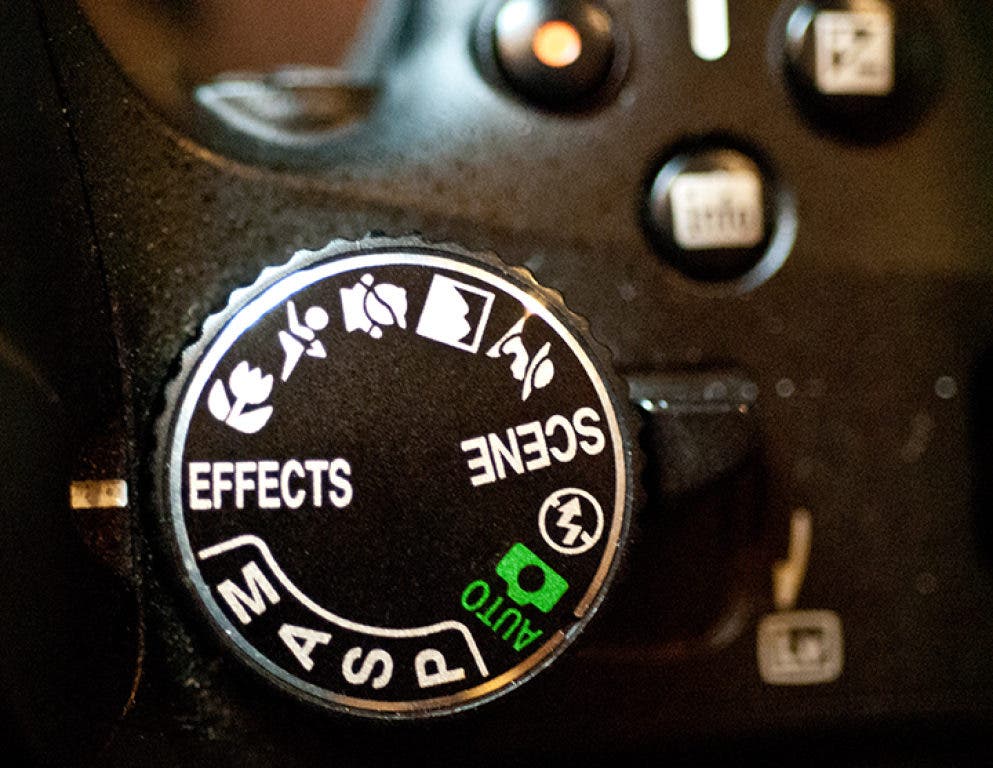
It’s not as scary as you might think! Setting your camera on something other than AUTO, that is.
You may feel like you are getting out of your comfort zone or that the AUTO setting is “good enough”, but if you would like to feel just a twinge of creativity when you “point and shoot”, spin that little knob on the top of your camera and see what happens.
Let’s just talk about the four basics settings: S, A, M, and P. Each of these settings indicates that, in some way, you are taking control of the exposure settings for your camera.
Find out what's happening in Land O' Lakesfor free with the latest updates from Patch.
S or Shutter Priority – When the dial is set to “S”, you are telling the camera that you are setting the shutter speed. The shutter speed is in fractions of a second with, for example, “100” indicating 1/100 of a second. The faster the shutter speed, the better you can freeze motion – motion of a moving subject or movement of the camera when the shutter button is pressed. The slower the shutter speed, the more light you let into the lens. When you do this, your camera will automatically set the aperture to allow the proper exposure. Note: Some cameras may use the symbol T or Tv meaning “time value” to indicate shutter speed.
A or Aperture Priority – When the dial is set to “A”, you are telling the camera that you are setting the Aperture or f-stop. The aperture is the size of the lens opening. It is measured by f-stop value. The larger the f-stop number, the smaller the aperture, resulting in more “depth of field” or “depth of focus,” meaning that more of the subject from near to far is in focus. The smaller the f-stop number, the larger the aperture, allowing more light into the lens. If you want just your subject to be in focus and the background out of focus, choose a large aperture. This would be a small f-stop number such as f/4. If you want everything in focus from foreground to background, use a small aperture or large f-stop number such as f/16 or f/22. When you do this, your camera will automatically set the shutter speed to allow the proper exposure. Be aware that a slow shutter speed (associated with smaller apertures) may lead to motion blur.
Find out what's happening in Land O' Lakesfor free with the latest updates from Patch.
M or Manual Mode – When the dial is set to “M”, you are telling the camera that you are setting both the shutter speed and the Aperture or f-stop. This is a true manual setting with the camera’s exposure meter playing no role in determining the correct exposure, although it may produce a warning indicating that the exposure is not correct.
P or Programmed Mode – When the dial is set to “P”, you are asking the camera to determine both the shutter speed and the Aperture or f-stop. This is very similar to the AUTO setting, but, depending on your camera, allows you some other manual controls. Typically the ISO value or light sensitivity setting is used in combination with Programmed Mode to ensure that adequate light is being captured. ISO values measure the sensitivity of the image sensor to light. Smaller ISO values (such as “100”) mean less “noise” is produced in your image. Noise is seen as graininess or small color specks that reduce the image quality. Increasing ISO numbers (up to as high as 3200 on many cameras) indicate higher sensitivity causing more light to be captured by the image sensor, but with increased noise.
So ideally, we want a fast shutter speed for sharp pictures with no motion blur, a small aperture (large f-stop) to have good depth of focus, and a low sensitivity (ISO) setting to reduce image noise, but each of these means that we are capturing less light. The secret is in compromise. Decide what’s important for each situation and apply those settings.
The automatic way to do that is using scene modes. The sports setting will set a fast shutter speed to capture motion. Other scene settings such as portrait and landscape may also adjust the focus as well as shutter speed, aperture, and sensitivity. I recommend you experiment with these modes. Take the same picture with different settings and you may be amazed at the results. Experiment. Play. Take lots of pictures. It costs nothing with a digital camera.
I also continue to recommend you read and reread your camera manual. Or do a Web search for more information. If you are ready for an in-depth workshop on using your camera and composing the perfect image, sign up for the Pasco Parks and Recreation three-class series being held on Saturdays, January 12, 19, and 26 from 1:00-4:00 p.m. The introductory price for the three sessions (9 hours of workshop training) is just $50 with a friend/companion ticket available for just $20 additional. Call the Land O’ Lakes Recreation Complex at 813-929-1220 or the instructor at 813-345-8778 or e-mail: info@con2000.com for more information.
Editor's note: Have a question about photography? Email Maury Griffith at info@con2000.com. He will answer select questions in future blog posts.