Health & Fitness
The Secret Information Hidden in Your Digital Photos
You can easily access date, time, camera settings and other information in your digital photos. Have a question about photography? Email Maury Griffith at info@con2000.com.
Don't you find it amazing that a string of ones and zeroes can be presented on your computer monitor or printer as a photograph. Usually each string of 24 bits (a bit is a zero or a one) represents the color of each pixel where a pixel is one of millions of dots that make up your image.
But what you may not know is that in addition to the image data, meta data or information about the image is also included. Meta data is most often described as data about data. If your image is a JPG, TIFF, PNG, PDF, PSD, or one of several other image types, the the meta data will typically be integrated within the image file. (Note: GIF and BMP files do not include metadata.)
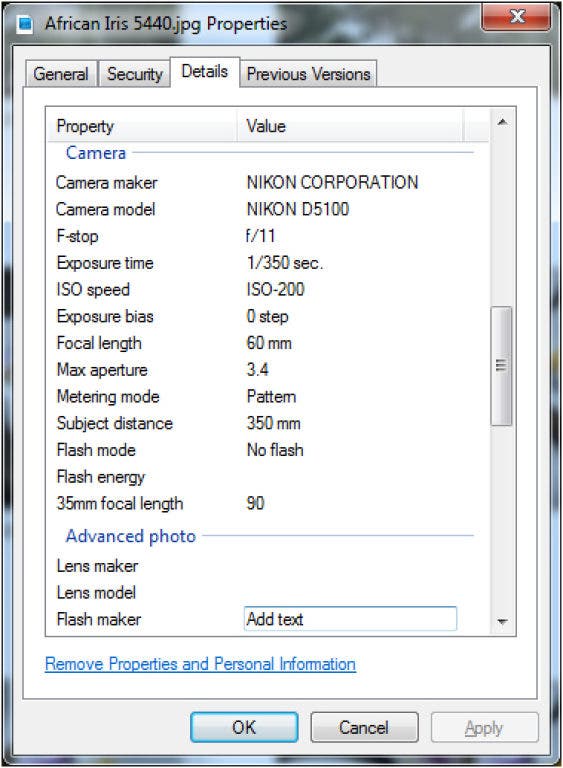
That information includes: your camera make and model, the lens, exposure time, f-stop, ISO sensitivity setting, flash mode, date, time, image size, and many other values that are stored by your camera when your image is written to your digital film card. Some cameras are even GPS enabled and record that latitude and longitude where the photo was taken. In fact, 555 meta data fields have been defined by standards groups.
Find out what's happening in Land O' Lakesfor free with the latest updates from Patch.
In addition to the information stored by your camera, image editing programs can add to the metadata. You, too, can store information in meta data files such as copyright information, rating (one to five stars), subject, and tags identifying the photo. Tags are most useful, allowing you to identify the photo in many ways: names, places, events, seasons, etc. Any number of tags can be added using image editors and applications that allow you not only to store the tags, but also to search later using those tags to find those images.
You can see the tags associated with your photo by right-clicking on your photo in Windows Explorer and selecting "Properties." Click the "Details" tab for image capture information. You can store information in tags using Windows Live Photo Gallery and many other photo management tools and applications available for both Windows and Mac computers.
Find out what's happening in Land O' Lakesfor free with the latest updates from Patch.
For more information on managing photos on your computer, join us this Thursday night at 7 p.m. at the Land O' Lakes Community Center for the next in our series of digital photography classes. Call 813-929-1229 or email info@con2000.com for more information.
Editor's note: Have a question about photography? Email Maury Griffith at info@con2000.com. He will answer select questions in future blog posts.