Recent studies point to a growing consumer preference for “self-service” when it comes to troubleshooting technology. According to a recent study from Fast Company, 70% of consumers expect a self-service option for answering questions and complaints, and a report from Zendesk found 91% of those surveyed would use a self-service option if it met their needs.
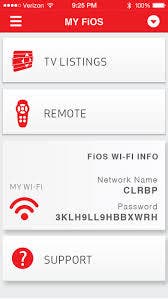
Verizon offers customers who prefer self-service options an app-based option through the My FiOS App, a hub to manage your home’s TV and Internet system from nearly anywhere. Whether it’s paying your bill, receiving My Rewards+ points or managing your router and parental controls, the app has it all.
FiOS network technology is the “gold standard” for Internet and entertainment delivery. But when something unexpected happens or an account just needs to be updated, you want help to be quick, easy and flexible. Smartphones and tablets make this level of customer care possible.
Find out what's happening in Laurelfor free with the latest updates from Patch.
If you have an issue with your phone, Internet or TV service, the My FiOS app provides an intuitive support guide to help you identify and troubleshoot solutions right from your Android or iOS smartphone or tablet. The app is free to download, but data usage may apply if your device is connected to a wireless network.
We invite you to check out the My FiOS App and its many features and benefits, including:
Find out what's happening in Laurelfor free with the latest updates from Patch.
- My Account & Services - View and pay your bill, see bill history, sign up for paper-free or auto-pay billing services, update your profile and more.
- Communications - Check and send Verizon.net email, listen to voicemail, review call logs and important messages from Verizon.
- My Rewards+ - Check point balances, track recent activity, redeem, gift others and learn how to capture more awards.
- Entertainment - Turn your device into a remote control, set your DVR, check TV listings and participate in Watch and Play social TV events to get My Rewards+ points.
- Support - Type your question and get support information and tools for your Verizon services.
- Shop - Upgrade or change your services, add premium channels and more.
- My Wi-Fi Info - Your home network wireless details are at your fingertips. Connect all of your devices in a snap.
Here is a link to a video which provides a quick walkthrough of how to access the support guides available through My FiOS: https://youtu.be/qhm4-PfH8gQ.