Business & Tech
The Best Ways to Advertise Online With Social Media: Instagram
Here are some of the best ways to use Instagram to advertise your business.

Welcome to the wonderful world of online advertising.
Since the rise of social networking sites, people have come to learn that using them to advertise has helped their business’ growth expand exponentially. There are so many different social networks in this day and age… but is any one better than the other? Do you need to use them all? And which one is best to advertise your business with?
Yes, you need to use all of them. With different social channels come different audiences, styles, and features. Today will go over advertising using Instagram.
Find out what's happening in Marlboroughfor free with the latest updates from Patch.
Instagram was originally launched in 2010 and bought by Facebook two years later at the tune of $1 billion. As of January 2017, it hosts 600 million individual accounts and has an estimated worth of $50 billion*. Hats off to Mark Zuckerberg for jumping on a good investment when he saw it.
Here are some of the best ways to use Instagram to advertise your business:
Find out what's happening in Marlboroughfor free with the latest updates from Patch.
Set up that account
When setting up your business’s Instagram account on your smartphone, you can register with your business email so notifications come to you. Just like Twitter, you’ll want to create a username that is under the name of your business so it can be easy to find, not your personal name or anyone else’s.
Your profile photo is a great place to put your business’s logo. Many people make the mistake of adding a picture of themselves, which makes your page look like a personal account. To add or change your profile picture, go to your profile and upload your photo by tapping the profile photo circle.
Your bio should be informative and friendly. With up to 150 characters of space, it could be anything from a mission statement to a slogan or tagline, or even something as simple as your store hours. I recommend you add your business’s location and the URL to your business’s website. You can make it Instagram-trendy by using emojis to explain these things instead of writing it out. For example, instead of writing out “Located in Boston, MA” in your bio, you can simply put the location emoji before "Boston, MA”.
Follow at a steady pace
On one hand, you want to follow every account you can in hopes that they follow you back. On the other hand, you definitely do not want to go overboard with the following. No one likes an account that is clearly just following you and everyone around you to build their follower base. You can’t follow more than 7,500 accounts, so don’t try to overdo it. Keep it simple and follow the people that matter like other local businesses, friends and family, and businesses you aspire to be like.
Picture this
Now it’s time to post some pictures! Top business accounts post 4-5 times per week on Instagram. You can post anything from photos or 1-minute videos of your business, your products, your area, your employees (with their permission), to pictures or videos you found on the Internet (site them of course) or graphics you created. To check out your local BBB’s Instagram page for ideas, visit instagram.com/bbbconnection/.
Instagram’s format automatically makes your photo a square (the standard size is 612 x 612 pixels). Although the square looks best on Instagram, not all pictures will fit perfectly. By tapping the resize button, you can switch the photo from a square to a portrait or landscape.
Now it’s time to edit! If your picture is too blurry, dark, bright, crooked or bland, Instagram lets you edit your photo to adjust your photo’s features. Just tap the “Edit” button next to “Filters”. For an easy fix, you can try Instagram’s “Lux” feature that automatically enhances your photo. After selecting a photo, tap the Lux feature that looks like a black and white sun at the top of the screen to apply Lux.
Now it’s time to slap on a filter. The most popular filters are Clarendon, Gingham, Juno, and Lark, but any filter that best suites your photo will do. You can change the intensity of the filter by double-tapping to filter and using the slider to adjust the filter strength.
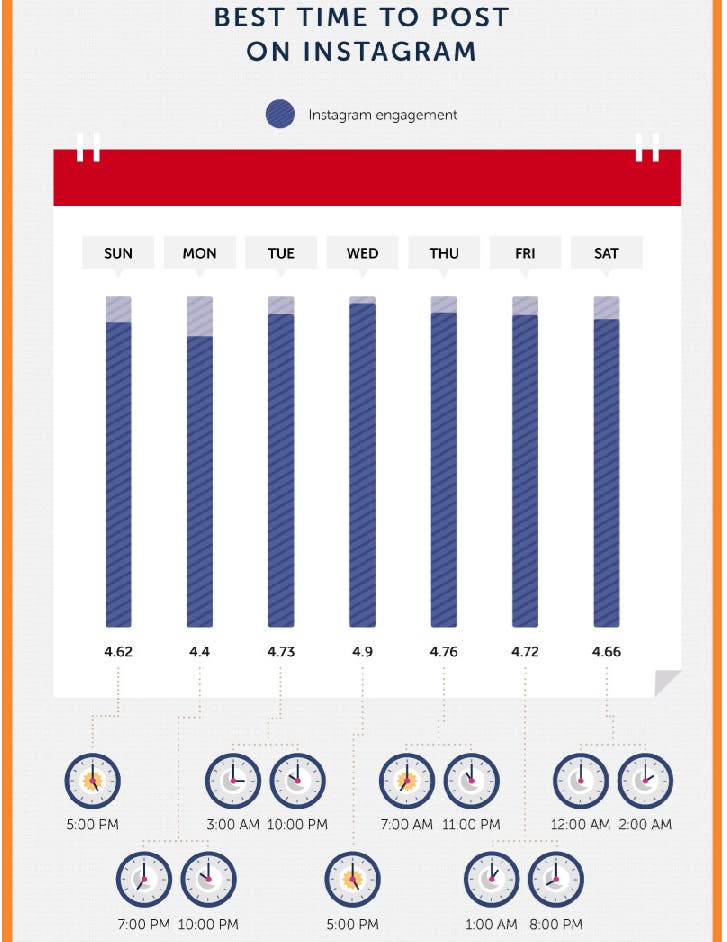
Check out this infographic from websitebuilder.org that maps out the best times to post on instagram every day of the week for maximum exposure below:
A picture is worth a thousand words
After you have finished editing your photo to your liking, you can add a caption, location, and tag other people. Captions can be up to 2,200 characters. Instagram is the place to be fun with your captions - they should be professional but friendly, almost like you are talking with the person you are showing the picture to. Feel free to add in some emojis for color and don’t forget your...
#Hashtags
Hashtags are a must for Instagram. Since users can search for posts by hashtags, they offer a different way to expand your reach. Use a main hashtag in all of your posts (such as #yourbusiness’sbrandname) to make it easier for people to find content related to your brand.
With a maximum of 30 hashtags per post, you can hashtag like crazy; I recommend at least 5 hashtags per post. Hashtags can be anywhere in your caption - right smack dab in the middle of a sentence or at the very end all together. Want to separate your hashtags from the rest of your caption? You can add a comment to your post where you can post all your hashtags and it will expand your reach just the same.
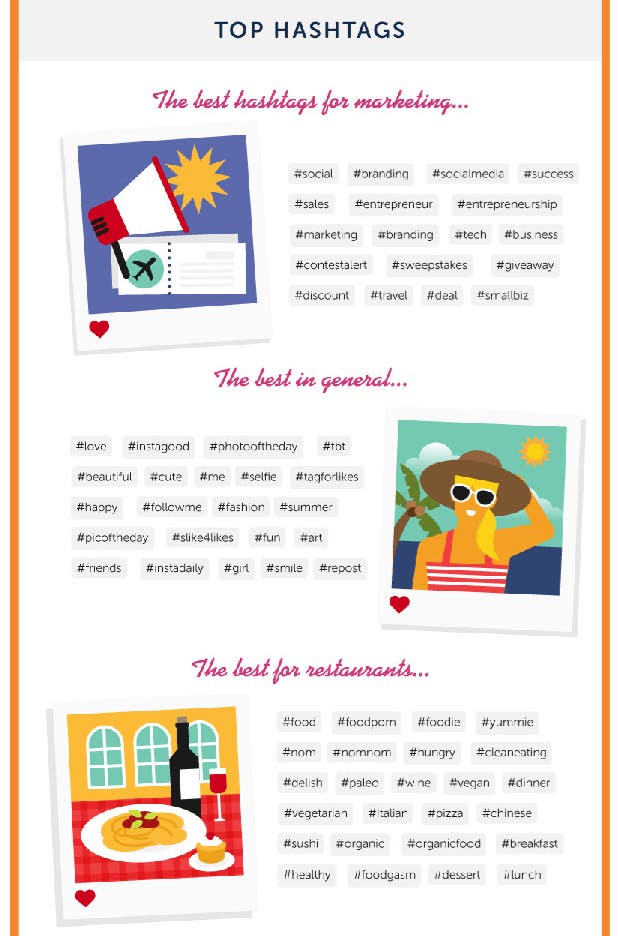
Check out this infographic from websitebuilder.org that maps out the top hashtags to post on instagram for marketing, restaurants, or just in general below:
Tell a story
Instagram stories are the photos of accounts that appear in circles at the top of your newsfeed. They are pictures and videos (live or in your camera reel) or even Boomerangs that can be viewed for only 24 hours. Using this feature allows your business to post content that doesn’t have to be as high-quality and professional as regular posts. You can even add face filters, hashtags, locations, and tag people to make your posts even more discoverable.
Every Tuesday during the entire month of June, BBB released a different blog post for each of the four most popular social media platforms of today with instructions on how to use each site to it’s full potential for your business’s benefit. As the last post of our 4-part blog post on The Best Ways To Advertise Online With Social Media, your business is ready to use Facebook, YouTube, Twitter, and now Instagram to show off your brand!
For more information you can trust, visit us at bbb.org/boston, like us on Facebook, or follow us on Twitter and Instagram.
*information and statistics provided by help.instagram.com, blog.instagram.com and instagram.com/press.