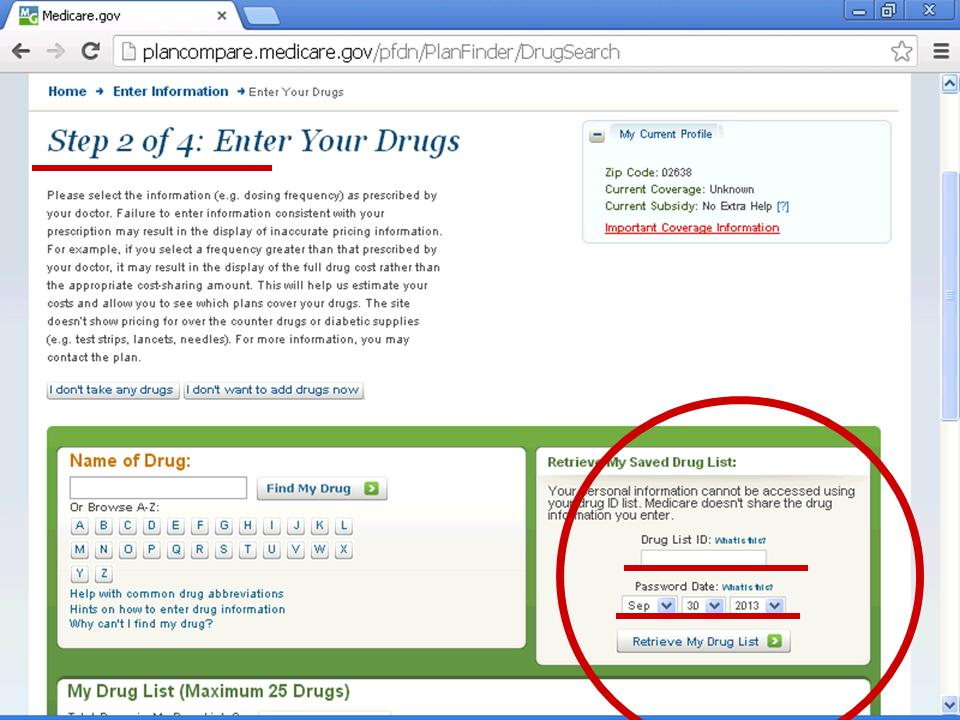
I wrote recently about the ease of future use you can get if you enter your drug list and pharmacy choice into the Medicare Plan Finder and save the Drug ID list and "passdate" for future use.
As the illustration above shows however, the Medicare Plan Finder Drug List ID and "passdate" feature is a little unusual in terms of how it works as compared to other web sites. You do not enter the Drug List ID and 'passdate' when you first click on Plan Finder. Instead, you have to wait until the second step of the process.
In the first step you enter your zip code and answer two questions about what Parts of Medicare and what kind of Medicare supplement(s) you have. You can answer 'you don't know" to both questions but Medicare Plan Finder may then not find the best option for you.
Whatever you enter on this Plan Finder, it has no idea it's you. It's just a list with an ID number and a 'passdate.'