

September 18 2013, finally the day is here and we are all excited to see what the iOS7 for Apple mobile devices and iPad looks like.
After several attempts to download and install the update, we kept getting the error “software update unavailable, please try again later” which obviously is caused due to the high traffic on Apple servers with everyone trying to get the update, so finally we got it installed and going, here are the few things we found different and got our attention on iOS7, if you find other stuff, feel free to add in the comment section and let us know what you think.
1- Home screen animation when you open and close an app is cool and the icons are flat however somehow Apple engineers managed to keep the icons look like the are floating on the background. However you can see a major change in the look of the signal icon and the green battery.
Find out what's happening in Fentonfor free with the latest updates from Patch.
2- When we tried to slide left to the search page, we noticed it doesn’t exist anymore, instead place your finger anywhere on the screen and slide down the search box will show up.
Find out what's happening in Fentonfor free with the latest updates from Patch.
3- Notification sliding from top to bottom is still the same with more items added such as today notifications, all or the missed one.
4- New command panel is added by sliding from bottom up, will give you control over airplane mode, wifi, bluetooth, don’t bother mode and rotate lock. Also they added the option to adjust the brightness of the screen, the ipod control, the Airdrop feature is also a cool option added in iOS7. We noticed in the bottom of the command panel, they added a flashlight button that will light the flash on your camera, shortcuts to the timer, calculator and the camera are there as well.
5- Multitask is a little confusing still in our opinion, even tho, it is meant to be more user friendly by showing you a preview of your app running in the background, it reminds us more of Android especially now you can slide the task up to close it, but again humans adapt to new things.
6- Grouping apps in one folder is still part of iOS7 however you can only see 9 at a time and you will have to slide within the folder to see the rest of your apps.
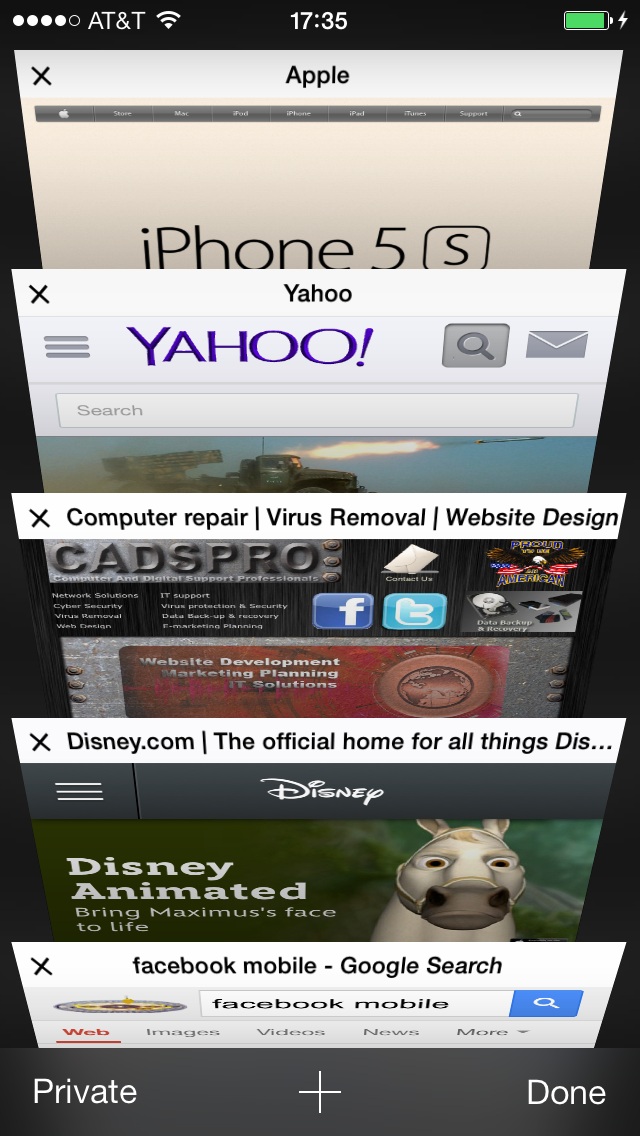
7- Safari, you can now search the web or type in an URL from one box, also it seems you can open more than the only 8 tabs that were allowed in previous iOS, another nice feature is displaying the tabs in a row giving you an easier preview of the open tabs to toggle between them.
8- Messaging is more Android looking now in a way, not sure but the whole feel and experience of messaging is different even the white keyboard is more flat.
Some might like it and others might not.
9- Call and keypad, this is a little different. Maybe the overall white in the majority of iOS7 made it look more flat, the white keypad with the circle buttons is very plain, almost feels like something in between Microsoft phone and Android.
We are still getting different feedbacks from people, Apple lovers are somewhat disappointed saying Steve Job would’ve never let this interface see the light because it brings the iPhone experience closer to Android instead of taking a lead to a new thing, when others are saying the new iOS7 make using the iPhone simpler easier and more slick.
What do you think of the new iOS7, give us your feedback.
You want more? visit us on Facebook