Health & Fitness
Changing it Up: Facebook Adds ‘Subscriber’ Option
Facebook is changing things up yet again. Learn about the new 'subscriptions' option and what your 'smart lists' are all about.
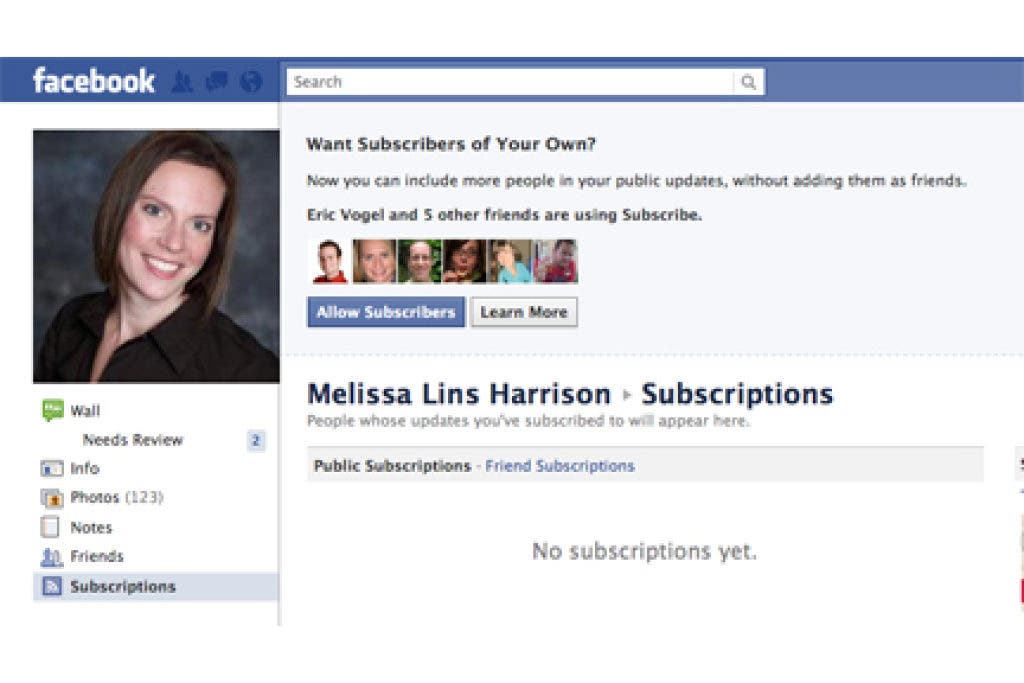

In what many predict is an effort to stay ahead of the social media game and take a page from Twitter's book, Facebook launched its 'subscriptions' options last week. You may have seen a few of your Facebook friends activating subscritptions and though, "What is that all about?"
The subscription skinny
Subscriptions are a way for those who are not necessarily your friend on Facebook to follow your public posts. When you click on your profile, you'll notice a 'subscriptions' option underneath your profile picture (see image at right). Click on that link and you'll be able to activate subscriptions so that others can see what you're saying in your status updates.
Subscriptions only work if you either a) default to 'public' in your privacy settings or b) click 'public' under your status update bar before broadcasting your news across the Web. (Note: Take a peek at your privacy settings under 'account.' Facebook tweaked those a bit as well making them much more user-friendly and easily accessible).
Find out what's happening in St. Michaelfor free with the latest updates from Patch.
Similar to a Twitter follower, Facebook is using its 'subscription' mode as a way to (possibly) engage more users and create additional relationships online. However, since Facebook is widely used as a way to engage with friends and family, it still remains to be seen if this new option will be quickly adopted by Facebook users (do you really care if anyone outside of your Facebook circle hears about your day? And do you even make those posts public anyway?)
Lists with an IQ
In addition to the new privacy layout and the 'subcribe' option, Facebook also took it upon itself to categorize our current Facebook friends into what it calls 'smart lists.' You may have noticed that your friends now fall in to categories (in addition to the lists you may have used within your privacy settings) that appear on the left side of your page (see second image at right). Basically, Facebook crawls through the information in your contacts profiles and categorizes those friends into said lists on the left.
Find out what's happening in St. Michaelfor free with the latest updates from Patch.
So, for instance, if you want to know what the recent posts from family members were, you simply click on those 'smart lists' on the left and the recent posts from those contacts are now showing in your news feed. However, these lists are not perfect, because it only accounts for information that users choose to share in their profile information (if a friend from the U of M doesn't list that school as a college, they aren't going to appear in your U of M 'smart list').
What does it all mean
For the people you are already friends with on Facebook, subscriptions don't mean a lot. You're already getting the news from those folks. And until more people activate the 'subscription' option, I don't think they'll be too much subscribing to begin with.
From a business standpoint, subscriptions don't mean a bunch either because either you 'like' a page or you don't. There is no subscription option (yet) for those who might want to see what a brand page is saying without 'liking' its page.
As for those 'smart lists'? In my opinion, these lists are just another way to make us crazy with micro-management of information. The less notifcations I have on any of my Facebook sidebars, the better (and lists just keep those notifications coming on the left for every person who posts new info group into those categories). If I want to filter my friends and information, I'll do it on my own--I don't need Facebook to computer-generate that for me.
What are your thoughts? Do you like the subscription option? Are you a fan of the new 'smart lists'?
Melissa Harrison is principal at Allée, a strategic communications consulting and brand agency. For more social media tips and info, 'like' the Allée Facebook page.