Health & Fitness
Viruses and Phishing Attacks – How to keep your computer and email safe
Understanding how many viruses are distributed and how to keep your computer safe.


So how do you protect your computer and other devices from threats, and your email safe?
Recent Virus or Phishing attacks:
What is a Phishing?
Find out what's happening in Maplewood-Brentwoodfor free with the latest updates from Patch.
More commonly aimed at identify theft – Phishing is the fraudulent practice of sending e-mails purporting to be from legitimate companies in order to induce individuals to reveal personal information.
IRS Phishing Scam
Find out what's happening in Maplewood-Brentwoodfor free with the latest updates from Patch.
Its tax season, which means cyber-thieves are trawling the Web and sending counterfeit email in the hopes of snaring your personal tax data. And they’ve created websites with reasonable-seeming addresses and legitimate-seeming emails in order to lure unsuspecting citizens into clicking on the wrong link or downloading a virus-laden PDF (See image link below).
A number of older viruses have recently come back into the mainstream, along with some newer ones.
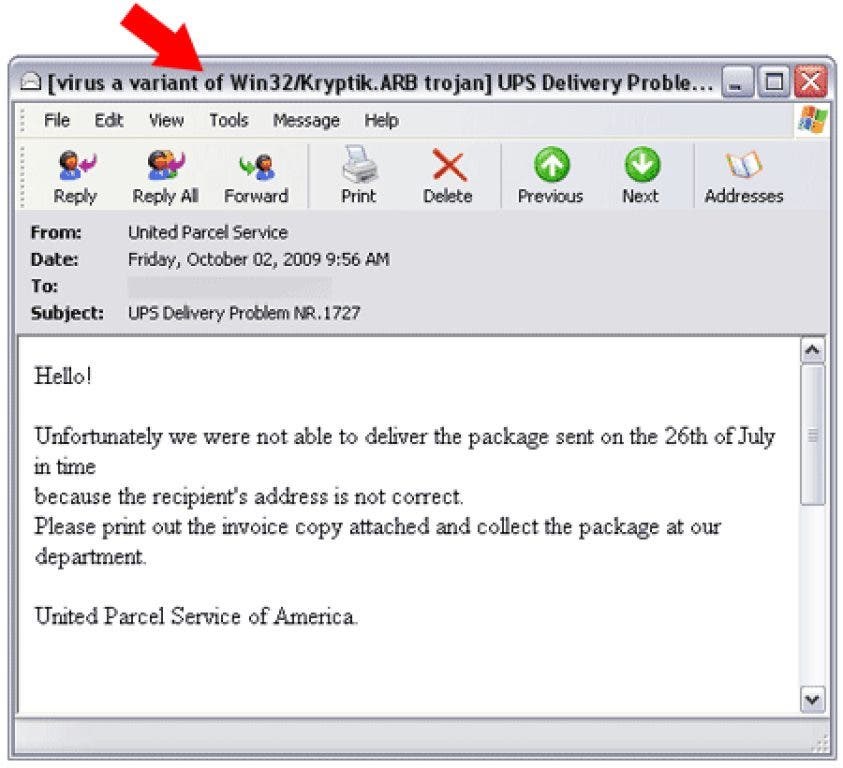
Have you received an email from ADT, FedEx, or UPS about a package?
Recent virus attacks have been distributed in the form of an email from both FedEx and UPS about package delivery (see screenshots).
Another recent virus attack (though scareware or “fake anti-virus”) was distributed through an email from ADP (the payroll company). Scareware or “Fake” anti-virus can be serious threat as well. Many of these programs infect your computer with numerous pop-up’s asking you pay for to clean-up your pc (when they are actually the one who infected your system to begin with), and though paying $39.95 or whatever the charge may be might remove the annoying pop-up’s – now your personal or business card information is in the hands of a scammer.
So how do you know you’re getting a real or fake email? There are a number of common things that can help you better identify whether the email is legit or not.
- Is it actually coming from the correct web address or domain name (i.e. FedEx.com, ups.com or the correct source)? This isn’t always a guarantee that the email isn’t a scam, but if it says it’s from FedEx and it’s coming from a non-FedEx email address delete it.
- Poor grammar – Is the email coming from a professional company but the grammar is very bad? This is usually a common indicator of a virus related email.
- Checking links – If you’re checking your email through a web browser you can MOVE your mouse over the link (DON’T click it) and the destination address will show up in the bottom left hand corner.
More about Phishing Scams – If you click on a link through an email and it’s asking for personal or login information MAKE SURE THE URL or WEB ADDRESS is actually the site you’re supposed to be on. Again – this is not a guarantee, if the phishing attempt is advanced – but many phishing attempts will take you to a completely different website.
- Simply read through the email thoroughly – many telltale sign will show up as the crafters of these virus emails aren’t very familiar with the organization they are pretending to be (for example the recent IRS Virus email contains the following):
- Poor grammar
- An incomplete address or strange hours in the signature block
- A link to a site in Germany (again – if checking email through a browser if the link goes to some “other” site that’s non-related, don’t click on it!
- email about “your” refund being sent to a mailing list
- One version of this scam claims the IRS is contacting you about your state tax refund – which obviously IS NOT handled by the IRS – it’s handled by each individual state.
- If it’s from someone you don’t know – don’t open it. For some of us job hunting and doing other activities sometimes that’s not option, but if you follow the above guideline it will help protect you.
In the last year or so, there has been an increasing number of hacked public domain free email accounts such as yahoo, Hotmail, MSN and many others. Please use the following password guidelines to protect your account from getting hacked (because once it is – usually your friends, family and work colleagues will start getting virus or phishing emails from your account).
Best Practices Password Guidelines:
- Don’t use easily identifiable information in your password, such as:
Your name, Username, Birthday, Pets Name, Childs Name, Alma Mater
- Try to create passwords with at least 8 characters, including special non-alphabetic/number characters, such as /&^%$#@!@
- Don’t use the same password for everything – particularly when it comes to online banking and other activities.
What to do if your email gets hacked:
Change your e-mail account password immediately, and check the e-mail account’s settings to make sure a hijacker does not have access to your account.
Example: In Gmail, click the gear icon in the upper right, then click “Settings,” then “Accounts and Import,” and check whether another account is listed in the “Grant access to your account” section.
If you suspect your account has been comprised – change your password immediately. If not changed within a few days your email may continue to be flagged as spam by other mail servers, resulting in your email not getting to your friends, family and colleagues.
Security Updates and Patching – Windows, Mac, Adobe Reader, Java and Flash Player
Whether you’re using a Windows PC or a Mac – there are always security updates put out to patch vulnerabilities in the operating system.
For Windows PC’s you can visit WindowsUpdate or click on Windows Update in the start menu.
For Mac’s or iOS devices (phones and tablets) – click here
To update Adobe Reader – simply open Adobe Reader on your computer and select [HELP], and then [CHECK FOR UPDATES]
Check to see if you have the latest version of Adobe Flash player
Anti-virus for your PC, Mac or Smartphone
Finally – make sure that your computer (and even your Smartphone) has an anti-virus program installed.
Though many are familiar with such names as Norton, Trend-Micro and Mcaffee – a couple of good FREE ANTI-VIRUS program are available such as Avast and AVG.
Some anti-virus programs will automatically setup scheduled scans during setup – others require manual setup. If you’re unsure contact a computer support professional.
We hope this information was helpful – and if you ever have a technology question or if we can help out in any way don’t hesitate to contact us at 314-646-1880.