Neighbor News
How to strip out drum midi from a loop with Ableton Live 10
Programming drums can be boring, try taking velocity and pattern data from an existing loop while remaining creative


Andy Raynor GAA
I am fortunate enough to be a beta tester for Ableton Live 10 which has a host of improvements, instead of reviewing those new enhancements (I will in an future blog), I'm going to show you a quick trick to take velocity and pattern data from an existing drum loop.
If you are like me, I prefer the sound design aspect of programming and mastering drums. Getting the samples, and effects in the right place are much more in line with what I like to do in the studio. Plus editing velocities and swing is tedious and time consuming. Andy Raynor gaa
Find out what's happening in Portsmouthfor free with the latest updates from Patch.
Enter Ableton Live and convert to drum midi functionality. When you open a new session bring a drum loop you like into an audio track (I like to choose drums that move with a nice swing and velocity, like a real drummer) the actual drum "sounds" don't matter at this moment.
Right click in the imported loop and select "Convert Drums to new midi track" see below:
Find out what's happening in Portsmouthfor free with the latest updates from Patch.
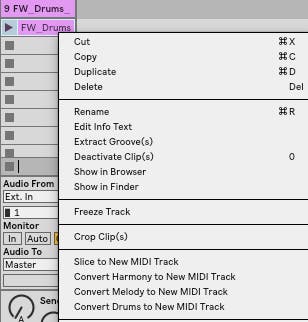
Ableton will read through the audio and create a midi track that includes what it believes the audio is relative to midi note data. For example, if there is a kick on 1,2,3,4 and an snare on 2 and 4 - then Ableton will place a midi note C1 on 1,2,3,4 and C2 on 2 and 4 - Ableton automatically maps the midi data based on a drum rack layout. Andy Raynor gaa
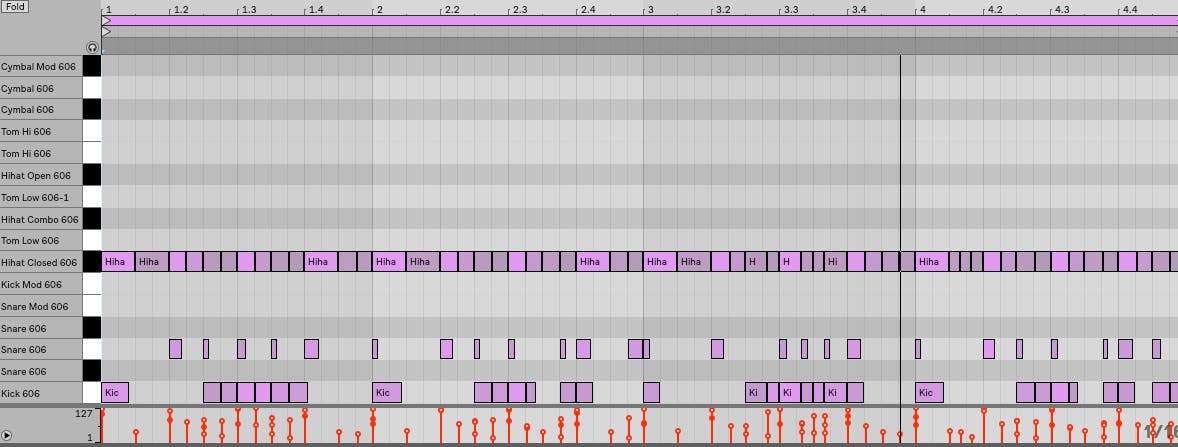
If you look at the new midi track you will see that Ableton also was nice enough to include velocity data, this is very cool if you are using a live loop done by a human drummer, in this way you capture performance data versus preprogrammed midi notes. Andy Raynor gaa