Neighbor News
Another Snow Day? St. Theresa's Students Don't Miss a Beat!
Technology is allowing middle school students to keep the educational momentum during snow closures.
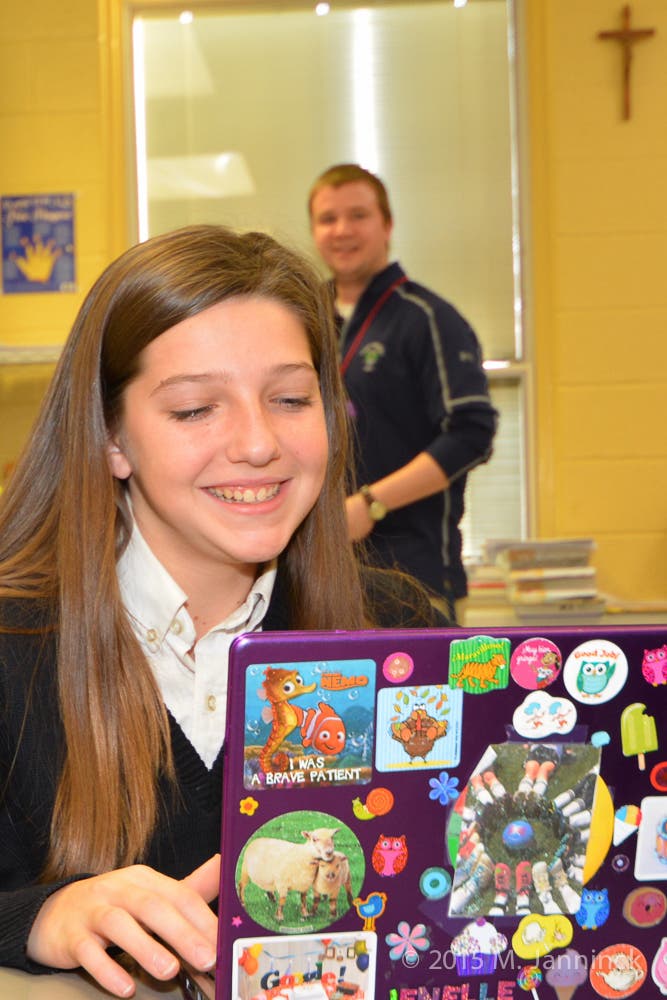


Ashburn, VA (Friday, January 30, 2015) – The use of technology is allowing St. Theresa’s middle school students not to miss a beat during snow closures. More importantly, it’s better preparing its students for the future.
This year, St. Theresa Catholic School in Ashburn, VA completed implementation of a one-to-one (1:1) computing model. The school issues a Chromebook to each middle school student that is theirs to keep upon graduation.
“Last year was a complete train wreck,” St. Theresa’s Principal Mrs. Carol Krichbaum laments. “We missed fourteen school days due to snow, not counting late openings. It was hard to get the kids refocused and get back the educational momentum.”
Find out what's happening in Ashburnfor free with the latest updates from Patch.
Things are much different this year, however. The use of technology is allowing St. Theresa’s middle school students to continue working and collaborating with their teachers and classmates. “Snow days were never meant to be holidays. You go out and play in the snow for a little bit, and then it’s back to work,” says Mrs. Krichbaum. It’s a change in paradigm, a different mindset. “Parents are very happy that teachers are keeping our students engaged in learning.” Teachers are right there with them online ready to answer a question, or review an assignment.
Beyond Snow Days, Bringing The Classroom of the 21st Century to St. Theresa Today
Find out what's happening in Ashburnfor free with the latest updates from Patch.
Although having the ability to keep the curriculum going during snow closures is a nice side effect of a broader technology strategy, it was not the main focus for embracing technology so widely. The driving force was “knowing that after leaving our school, our students would need to be successful in using technology in high school, college, and work. We want them to be fully prepared,” Mrs. Krichbaum relates.
Mrs. Krichbaum fully appreciates the role technology is playing in our 21st century world, and how profoundly it has changed society. “We are truly at an unprecedented time in history. Education has changed very little over centuries. If we were able to go back in time and walk into a hospital or store one hundred years ago,” Mrs. Krichbaum describes. “They would look remarkably different than today. However, until recently, teaching had not changed. It was still the teacher at the front of the room, with a blackboard and a textbook as the primary educational tools. When students walk into their classroom, they should not be going back in time, leaving behind a century of technological progress,” Mrs. Krichbaum relates.
This trend will continue to permeate every aspect of our students’ life. The skills that helped make us, our parents, and grandparents successful, are very different than the skills needed in the 21st century. “We know that our students will need to have the research and technical skills to succeed in high school and college, but most importantly the critical thinking and collaboration skills to succeed in the workplace of the future,” explains Mrs. Krichbaum. There is wide consensus in the educational community that four skills will play a critical role helping prepare our children for the future. These have come to be known as the four C’s: Critical Thinking, Communication, Collaboration, and Creativity.
Enhancing Education at St. Theresa Through the Use of Technology
“It has opened up a whole new educational world for us!” Mrs. Therese Green, Technology Teacher at St. Theresa describes. Using tools such as Google Classroom, teachers can assign work online that automatically generates grades. “This has changed the teachers’ workflow,” freeing them up to use their time in a host of high value activities, such as spending more time giving instantaneous online feedback to a student, observing student progress in real-time, spending more time helping those that could use a little more attention, challenging those students that are able to progress at a faster rate, researching tools to further enhance lessons, and exploring innovative ways of teaching.
It is also allowing teachers to completely look at how education is delivered in a whole new light. For example, a teacher can decide to “flip the classroom,” meaning, the teacher can deliver the lesson via video to be watched at home, and have the students do their homework in the classroom where they have the teacher as a resource while they are applying what they have learned.
“Seeing the level of collaboration and creativity taking place among our students has been a true eye opener,” describes Mrs. Tess Venkat, Technology Specialist. “It’s similar to what you see in college settings. They are creating impressive reports working together virtually.” Students are flexing their creative muscles. Without any type of assignment, the 7th grade started creating a story where each student contributed a piece and built upon what others had done. “It’s very impressive to see what they are able to do on their own,” says Mrs. Venkat.
Mrs. Krichbaum describes how students are sharing their notes, “organically compiling the best set of notes through collaboration. When group work is assigned, it’s easy for teachers to tell who contributed what and what level of effort what put forth.” In this day and age when kids have so many after school commitments, technology is helping them collaborate and work together virtually.
A Tight Leash on Technology with a Keen Eye for Safety
Online safety has been paramount in the implementation of this program. The Chromebooks have greatly enhanced student engagement; they appreciate the great wealth of research tools that are available to them. They enjoy being able to exercise their creativity by making visually attractive documents and embedding different types of media. It’s enabling teachers to do so much to enhance the curriculum. However, “our students’ online safety is our top priority,” says Mrs. Krichbaum. Everything takes a backseat to safety.
Just like everything else in life, we are starting the students out with a very tight leash. Mrs. Venkat explains that only specific authorized educational websites are allowed. “The Chromebooks are not able to access any social media, YouTube, Google e-mail, and even the camera is turned off. The Chromebooks can not be altered in any way, no apps can be added, and no content can be deleted.” Using a sophisticated software called Securly, the staff at St. Theresa can monitor any website that students attempt to use. It also prevents the students from reaching any content that is not approved by the school. Securly also enables the tech department to monitor any and all activities including when the Chromebooks are in use at home.
When we first discussed implementing a 1:1 computer model, many teachers were afraid that computers in the classroom would be distracting. Some teachers feared that it would be seen as a social media toy and classroom management would be an issue, shares Mrs. Green. However, that has not been the case. “We have great security tools in place to prevent that.” These tools allow us to customize what our students can access. As they progress through the grades, and we see mature behavior, we can adjust these settings as we see fit, describes Mrs. Venkat.
Thus far, “we have been very impressed on how responsible our students have been. Out of one hundred seventy-three middle school students, we have only had three incidents of accidental damage. The students are doing a great job charging their Chromebooks, and safely transporting them to and from school every day. In cases where the machine is damaged, the use of a cloud-computing platform ensures that everything is backed up to the cloud. Chromebooks don’t have a hard-drive, all the data resides in the student’s Google Classroom account. If a student forgets their laptop at home, forgets to charge it, or is accidentally damages the Chromebook, the student can get a loaner and not miss a beat. All their documents will be available to them in seconds after booting up.
Making Technology Work for Everyone
The cost of Chromebooks encompass support, security, training, apps, e-books, etc. which is spread out over a three year period as a technology fee. “I am proud of what my staff has been able to achieve. They have worked incredibly hard to keep this program affordable for the school and our families,” relates Mrs. Krichbaum. This program makes it possible for each family to give their student a laptop that is dedicated to meet their child’s learning needs. We are treating the Chromebooks as another educational tool such as textbooks. We are pleased that we are able to provide a safe computing environment that is backed and supported by our technical staff. Our students don’t have to compete to get time on the computer with the rest of the family. Regardless of economic circumstance, every student has the same platform. “There are no haves or have nots,” further relates Mrs. Krichbaum.
Not Technology for Technology Sake
In a tidal wave of change, there are many important things that are not changing at St. Theresa. “The curriculum is not changing. What we teach and how we teach it are not changing. We are not embracing technology for technology’s sake,” Mrs. Krichbaum emphasizes. We are using technology to enhance the same curriculum that we have been teaching. While technology does help make some things easier for the teachers and more engaging for our students, what we are teaching is remaining the same. We are bending technology to fit our educational goals, and not letting technology drive what we teach and how we teach. “Every teacher in this building feels that responsibility; we want to make technology work for us, not the other way around.” We will continue to teach penmanship, continue to emphasize good writing, and strong Catholic values ... we are only adding the teaching of 21st century skills along with our traditional curricula, practices and values.