Health & Fitness
Understanding White Balance
-So what does White Balance do? -White Balance at the simplest is a setting that is used to get the colors in the image as accurate as possible.
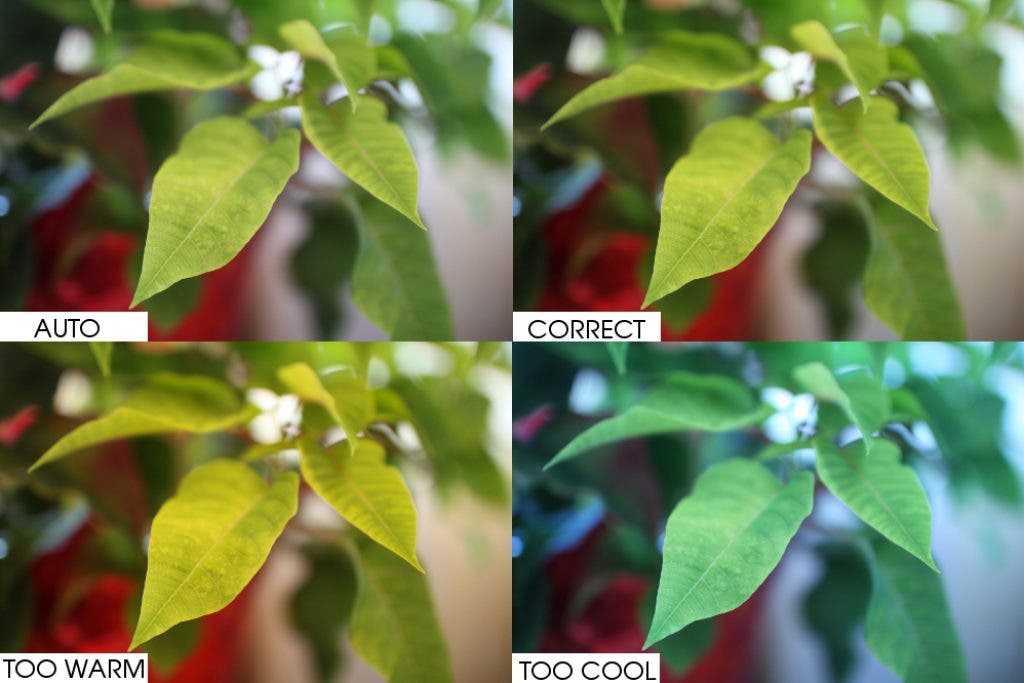
If your computer monitor is correctly adjusted, then by looking at the photos you can tell that the color is different in each one. This is because the White Balance mode is set differently in each photo. As you probably can tell the Auto White Balance photo and the Correct White Balance look very similar. The only difference is that the Correct White Balance photo is a bit warmer, and that the colors seem to be a tad more vibrant. As for the other two photos one is too orange (warm) and the other one seems to be too cool (blue). You personally may have experienced this before after taking a photo, and possibly wondered why the color of the picture you just took was off. The reason why some photos have orange, blue, yellow etc look to them is that different sources of light cast off different ‘color’ (temperature). An example can be given: tungsten (incandescent/bulbs) light adds a yellowish cast to a photo, whereas fluorescent lighting adds a bluish tint.
-So what does White Balance do?
-White Balance at the simplest is a setting that is used to get the colors in the image as accurate as possible.
Find out what's happening in Bonney Lake-Sumnerfor free with the latest updates from Patch.
We usually do not notice the temperature difference casted from different lighting because our brain automatically adjusts. So unless the case is severe (such as a black light) we will perceive a white surface as white. Digital cameras however do not have such a sensor to automatically adjust as well and will sometimes need us to tell it how to handle different light. This is where White Balance comes in to play. When the lighting casts off more of a cooler (blue or green) color you would tell the camera to warm things up, vice versa for warmer light you’ll tell the camera to cool down.
Basic Settings found on most cameras:
Find out what's happening in Bonney Lake-Sumnerfor free with the latest updates from Patch.
Auto- The camera will make its best guess. This works in most cases but it is worth going out of it for trickier lighting.
Daylight/Sunny- This sets things to a fairly ‘normal’ white balance.
Shade- The light in shade is generally cooler than shooting in direct sunlight. This mode will warm things up a little.
Cloudy- This mode will warm the photo up a tad more than the ‘daylight’ setting.
Tungsten- This is used usually for indoor shooting, especially under tungsten (incandescent) lighting; such as a light bulb. This mode generally cools down the colors in the image.
Fluorescent- This setting balances the ‘cool’ cast of fluorescent light by warming up your shots a bit.
Flash- The flash of a camera can be quite a cool light so in this mode you’ll find it warms up your image.
If you have any questions just drop me a comment, or you can contact me at christian@christianjanderson.com. Also feel free to visit my photoblog or view my portfolio. You can even Like me on Facebook!