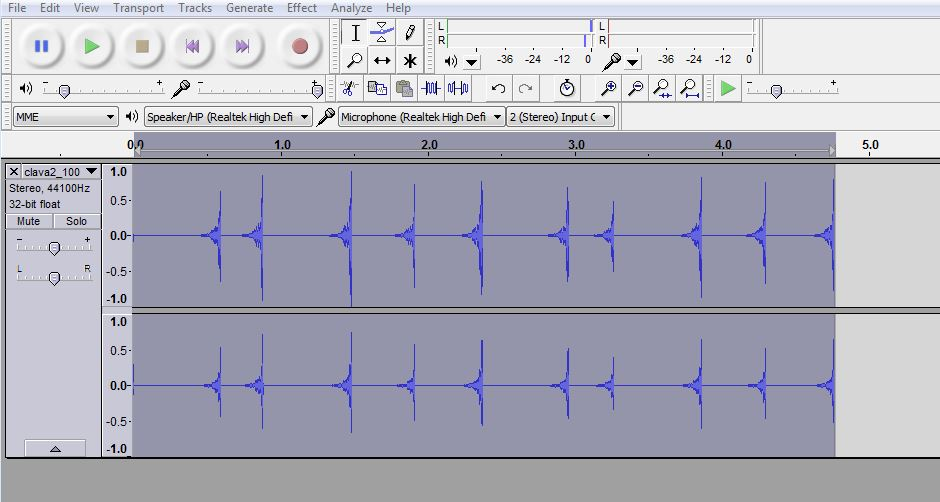


How do you "see" your music? It's pretty simple. Each sound makes a specific wave pattern that is represented by lines that vary in height much like a heartbeat monitor. Think of the heartbeat as the constant pulse of the music and you'll see what I mean. Download this file Clava Sound. Remember to save it in a familiar location. Save it with the rest of your sounds in the same folder to make it easier.
Notice this file is not a .wav file, it is an .aiff file. It's another form of a sound file. Remember, there are many types of sounds that the Audacity program can play. Open your Audacity program and then open the clava2_100.aiff file you just downloaded. You should see the pattern in Picture 1.
Shift + Play the file and watch as the progress indicator moves with the sound. You'll "see" how the pattern repeats and you'll get familiar with how the sound's volume increase and decrease are represented by the height of the pulse indicators.
Now let's change the size of the wave. We do this by simply increasing the volume of the sound. Click on the Effect menu item and chose the Amplify item. You'll see the window as seen in Picture 2 In the box next to Amplification (dB): put in the value of 10 and click ok. You should immediately see the difference. The size of the wave pulses have increased! You should also hear the difference when you play that file.
Let's change another aspect and see how the sound changes. Now that you are familiar with how the sound looks ... let's reverse it and see what it looks like when played backwards. The results will be noticeable! Once again, click the Effect menu item and find the Reverse option in the list and click it. As you can see in Picture 3 the image has flipped completely backwards. The waves now are "pointing" to the left. Now click Shift + Play and give it a listen. See how the high points are the impact and the low points are the tapering off of the sound.
Make your own edits and see how the file changes.
-D