

While studying Introductory Computer Science, one of the first things my professor said to me was “Computers are incredibly stupid. They are only capable of doing one thing: what you tell it to.” Every problem that develops with a computer is the result of some person telling the computer to do the wrong thing. Sometimes that person is the writer of the program; sometimes that person is a malicious hacker who wants your personal information; sometimes that person is you.
The first step to fixing a problem is understanding how it became a problem in the first place. This is today’s lesson.
-----
No doubt at some point you’ve downloaded something to your computer: programs such as iTunes or Spotify, files such as PDFs from the School District website, or even web-pages like the one you are reading right now. Downloading is how we receive the information someone else on the internet has shared with us.
It should come as no surprise then that many people on the internet want something in return. Most companies will charge you money for their programs or files, or will at least ask for donations (see Wikipedia). Other companies will settle for the personal information they can gather by leaving a seemingly harmless program running on your computer at all times. They give this to you in the form of an internet toolbar.
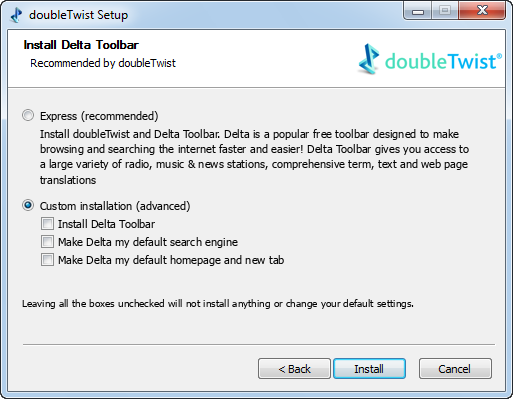
Toolbars are themselves packaged into other programs that you want, and you install them without paying much attention. See Figure 1 in the pictures above: I am downloading a program called the “FREE YouTube Downloader.” At one step in the process, everything freezes and this screen pops up- “Delta search allows you to discover better search results…..”
These are the things you should be paying attention to and be trying to avoid. By reading the fine print next to the check boxes I will have installed the toolbar, made Delta my default search engine (as opposed to Google or Bing) and I will have made Delta my homepage. Delta will then be free to collect any information that goes into my internet searches.
By unclicking the check boxes, you have prevented yourself from downloading a piece of potentially dangerous software. Some programs will try to trick you with “express installation” as shown in Figure 2 above. By selecting the express installation you have committed to downloading the Delta toolbar. When you perform a “custom installation” you are allowed to choose whether or not you want the toolbar.
-----
Toolbars, while appearing harmless on the surface, serve as a way for companies to gather your personal information and put programs on your computer that you don’t want. Remember to read the fine print next time you download a program, and un-check what doesn’t belong!