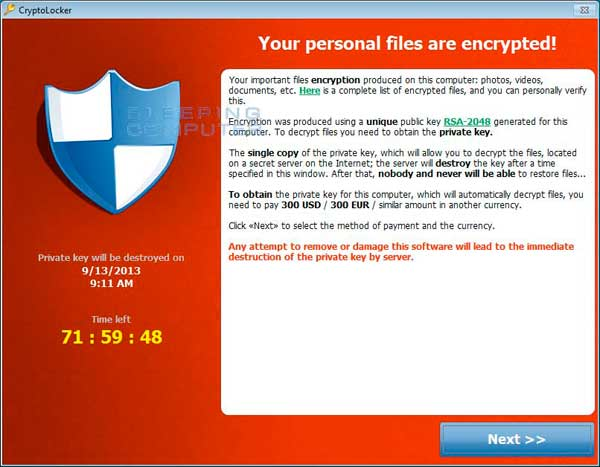
CryptoLocker, not your average computer virus.
A good part of my business is virus removal. A couple of years back removing a pesky virus was a 15 minute job, now they can take days. It’s very rare that a computer will have only one virus, reason being is that once a virus infiltrates your computer it will take others in with it. All of a sudden there is a virus called CryptoLocker.
CryptoLocker is a ransomware trojan which targets computers running Microsoft Windows and first surfaced in September 2013 and is typically spread through emails with attachments. What this virus does is actually encrypts the files on your hard drive and holds them ransom for 72 hours until you pay anywhere between $100 to $300. If you decide not to pay your files will be permanently encrypted and or the fee will be increased by 10X.
At this time there is no known cure for this virus.
The following are good ways to protect your computer:
1) Have one of the most updated Windows operating systems installed on your computer. Windows 7 or 8.1.
2) Use a good anti-virus program. The free ones and ones provided by your internet provider are useless. Even some of the paid types are useless, Norton and McAfee are the two most popular and therefore are the two most targeted by the virus writer. The best that I have found is ESET. www.eset.com
3) Never open an email with an attachment from someone you don’t know. CryptoLocker usually comes in an email that says it is from: UPS / USPS / payroll company / payment overdue / Outlook error, etc..
4) Another way of getting this and other viruses are through file sharing programs such as uTorrent. Many times the free music or free software people are trying to download contain viruses. I have not yet read that CryptoLocker is spread through these types of programs but I feel it is only a matter of time.
5) Contact a knowledgeable computer professional, they can install certain tools in the background of your PC to prevent CryptoLocker from installing.
6) Backup, Backup, & Backup, did I say Backup? Even if the payment is made to CryptoLocker there is no guarantee that your data will be recovered. These are unscrupulous people writing these viruses and they cannot be trusted. If your data is backed up then a professional computer tech can re-install your Windows operating system and migrate your data back onto your computer.
7) When ever possible always backup to a remote location (the cloud). I always recommend Carbonite to my customers. www.carbonite.com
What to do if you get the CryptoLocker or any other virus?
1) Shut your computer off; if you cannot get to the Windows START button then hold in the power button for 6 seconds. Unplug your computer and find a professional computer tech. I stress professional because I have seen more harm done to a computer by the person’s neighbor, guy at work, their son / daughter and Uncle Harry.
2) Get your computer to your local professional tech, try and stay away from the big box stores. In most cases they will tell you your computer is not worth fixing and you should go over to aisle 7 and buy a new one.
So the next time you get an email saying your UPS package was delayed, or you won a fantastic prize just remember on the internet as in life there is no such thing as a free lunch.