Health & Fitness
How To Get Facebook Notifications From Patch
Get the latest local news as it happens by enabling Facebook notifications.


Article written by Liana Messina
Get social with Patch! Follow these three steps to get a notification whenever your Patch page posts to Facebook.
Here’s how:
Find out what's happening in Mill Valleyfor free with the latest updates from Patch.
Step 1: Search for your Patch page on Facebook. Follow the page by clicking ‘Like’ at the top right.

Find out what's happening in Mill Valleyfor free with the latest updates from Patch.
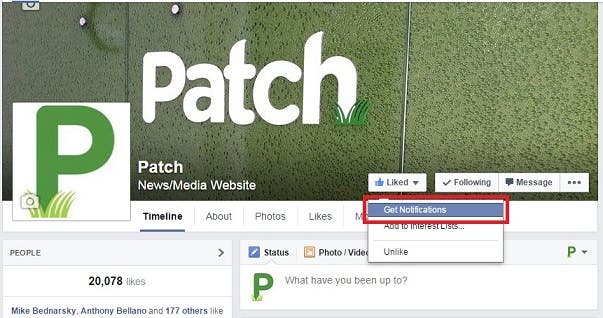
Step 2: Once you’ve followed Patch on Facebook, hover over the ‘Liked’ box and you’ll see an option to ‘Get Notifications’ in the drop down menu.

Step 3: Once you’ve clicked ‘Get Notifications,’ a check mark will appear. Voila! Now, the next time an update is posted, you’ll receive a notification from Patch straight to your Facebook.

Learn how to get even more out of Patch with these simple tips:
For even more ways to stay connected with Patch, check out Patch Pets and Patch Weird on Facebook.
Get more local news delivered straight to your inbox. Sign up for free Patch newsletters and alerts.