GEEKNOTE: I had the opportunity to spend a good part of the weekend at my wife's 40th High School reunion. This was absolutely "turnabout is fair play" as she went to mine a few weeks back.
It was fun trying to match the folks in attendance with the pictures of them from high school. Almost all of us have gained a bit of weight and some of the guys with the biggest hair from back in the day are now bald.
Photography has changed quite a bit in the 40 years since we graduated from high school. Back then, casual photographers had Instamatics or Polaroids and those of us where were semi-serious had 35mm cameras.
Find out what's happening in New Port Richeyfor free with the latest updates from Patch.
I'd started out with a used Argus C3 and picked up a 35mm Nikon while attending the Scout World Jamboree in Japan. They took really good pictures, but there was quite a bit of expense involved.
The film wasn't THAT expensive, but the developing and printing always ran up the tab. I spent quite a bit of money having some very poor shots developed. I ultimately learned to develop my own black and white prints in the laundry room, I still didn't know what sort of pictures I had until quite a while after I took them.
Find out what's happening in New Port Richeyfor free with the latest updates from Patch.
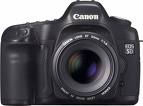
My how things have changed. Quite a few of the newer phones take passable photos and even the moderately priced digital cameras are pretty good. The digital SLR cameras I've had a chance to play with are absolutely amazing.
With the change to digital, the way we need to think about our photos has changed too... no more shoe boxes full of old prints and negatives.
The first thing I'd suggest is that you consider talking to Jim Smetzer over at Pasco Camera about signing up for a digital photography course. For a lot of folks, a class like this would be money well spent.
The second thing I'd suggest is that you think about how you are storing those pictures. There are several options:
1. You can copy them to your computer. This is fine, so long as you have a plan to archive them. You don't want the death of your computer to wipe out all your pictures.
2. Archive the pictures to CDs or DVDs. This works very well and both CDs and DVDs should last for years with proper handling.
3. Copy the pictures to USB drives. I don't recommend this as they have a nasty way of dying with little or no notice.
4. Upload your pictures to a photo storage service or a social media place like facebook. This also works pretty well and lets you share the photos. The biggest disadvantage is that most of these services will compress your pictures, making future enlargements difficult.
5. Have your favorite pictures printed out. This can be as simple as 4x6 prints from the one-hour shop at Walgrees to really nice enlargements that you can have matted and framed for display in your home.
There are digital picture frames out there that you can use to display your favorite photos. You can also set up your computer's screen saver to run through a batch of your favorites. I have some of my favorite photos set as the backgrounds for my computer screens at home and work.
One of the most interesting things I saw at my wife's reunion was how many of her classmates came with their iPADs and were taking pictures and movies with them. The screen of an iPAD is certainly large enough to get a good view of what you are shooting, but they can be a little clumsy to use and at least one of them got dropped. I'd rather drop a cheap point and shoot digital camera that an expensive tablet computer.
I'd love to hear from any of you who have come up with creative ways to display your digital pictures.
Feel free to drop me a note or leave a comment here if you have any questions about your computer or your office network.
Rob Marlowe, Senior Geek, Gulfcoast Networking, Inc.
http://www.gulfcoastnetworking.com
(Rob also serves as deputy mayor of the City of New Port Richey. Opinions expressed here are his own and do not necessarily represent the position of the city.)