Business & Tech
Business Owners: Claim Your Listing on Patch. It's Free!
Managing your own listing on Patch Places will allow you to better promote your business and inform Elmhurst Patch readers.


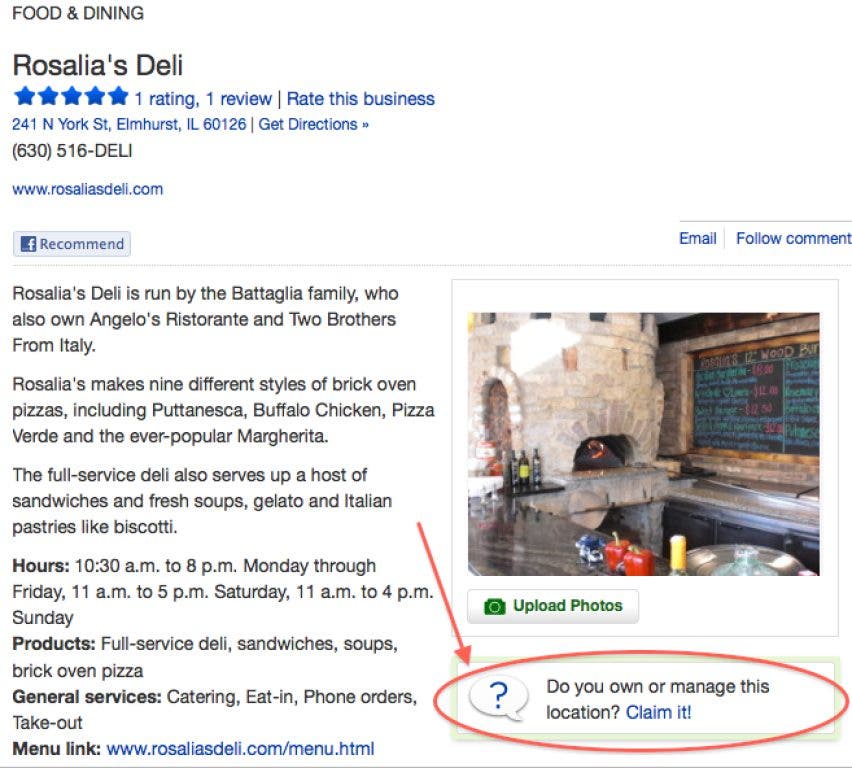
Before Elmhurst Patch launched in Sept. 2010, editors and freelancers ventured to local businesses in order to collect information for our directory. The result is Patch Places, a spot where users can find descriptions, hours, accepted payment methods and much more for spots around town.
All Patch users can add events taking place at local spots, rate the business on a scale of one to five stars and add a review.
But owners of local businesses get extra bonuses when they claim a listing.
To own your Patch listing:
You must be a registered user. If you already are, make sure you're logged in. If you aren't, click "join" on the upper right corner of the page and create a user name and password.
Find out what's happening in Elmhurstfor free with the latest updates from Patch.
Now that you're logged in, go to the Places directory and do a search for your business. Find it? Great. If you didn't (What?! We're so sorry for the oversight!) contact Elmhurst Patch Editor Karen Chadra at karenc@patch.com and we'll get one for you right away.
Now that you've found your business online, look for the green box on the right side that says "Do you own or manage this location? Claim it!" A form will pop up asking for your name, contact information and proof of ownership.
Find out what's happening in Elmhurstfor free with the latest updates from Patch.
Within a couple of days, someone from Patch will contact you to verify you're the owner, and the listing will become officially yours (as it should be).
Once approved, you'll have a "Manage Your Listing" button on the top of your Places page. Click the button to be taken to your dashboard.
From the dashboard, you can make changes and updates to your listing. On the left side of the dashboard you have several options: Your Stats, Edit Listing, Manage Photos & Media, Reviews, Free Tools, Paid Tools and Contact Sales.
Your Stats:
Here you can see how many users have rated, reviewed or followed your listing. You can email your customers to seek out more reviews, and link the Patch Place to your Facebook or Twitter account.
Edit Listing:
Add photos, website information, hours of operation, contact information and more under the "basic info" tab. Some of this information cannot be changed, but you can request a new description if you think your business is inaccurately described.
Choose "extra info" to add information like the founding date of your business, what kinds of payments you accept, if there's street parking or a lot, and much more.
Manage Photos & Media:
Here you can add and edit photos and choose which image is featured. If you have video or PDFs, you would add that here too.
Reviews:
You can see what people have to say about your business.
Free Tools:
Post events and add job openings to our classifieds section, also known as the Marketplace.
Paid Tools:
You can upgrade your listing with a video profile, add a message from the owner and become a featured business on the Places page for a fee. Learn more about these options and how to get in touch with a sales team member.
Claim your listing today to help keep Patch users up to date with your company and keep your listing looking fresh. Hosting a charity event? Let people know. Participating in a business expo? Share your success! You can also respond to your biggest fans—and critics—in the review section on your company's page.
It's a great way to control your online presence.
Get more local news delivered straight to your inbox. Sign up for free Patch newsletters and alerts.