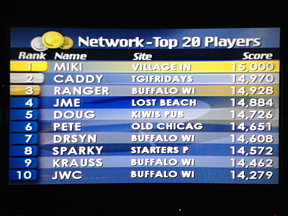
Buzztime on-screen trivia at the Village Inn in Skokie (6050 Lincoln Ave) is fun, challenging, and free. Here’s a quick introduction to how it works.
Buzztime (known as NTN Communications from 1985 to 2005) is a California-based company that broadcasts trivia and other games to nearly 4,000 bars and restaurants in the US, Canada, and the Caribbean. When you play Buzztime at the Village Inn (or any other establishment), you are competing against others at that venue, as well as against thousands of players throughout the entire network.
Buzztime trivia questions appear on an overhead screen, just like the ones that are showing the Cubs, Sox, Bulls, Bears, Hawks, or any other station. If there’s not a screen showing Buzztime near your table, ask your server to have one switched to Buzztime.
Find out what's happening in Skokiefor free with the latest updates from Patch.
Most Buzztime games start on the hour, the half hour, or the quarter hour. As you become more familiar with the schedule of games, you’ll learn which ones start when. Of course, you can begin playing anytime, and finish playing anytime, but as you get more serious about your scores and the competition, you’ll want to begin playing just prior to the start of a game, and finish playing just after a game ends.
Players compete using a wireless device called a Playmaker – a tabletop gadget about the size of a cigar box. You can ask your server to get you a Playmaker, or you can grab one yourself at any venue where they are stored in a public rack.
Find out what's happening in Skokiefor free with the latest updates from Patch.
Press the ‘start’ button to initiate the login sequence. Choose ‘trivia’ (as opposed to ‘poker’) and choose ‘play as a guest’. You’ll need to select one of the pre-determined guest names, or come up with an acceptable screen name on your own. (My screen name is MIKI – also the name of my cat!)
Now, watch the screen for the next question. Multiple-choice answers will soon be displayed. Press the number of the answer you think is correct. You don’t need to press ‘enter’ – just a number. Press a number as soon as you can, because in most of the trivia games, the available points begin to “tick down” the longer you wait. In come games, clues appear as the point values “tick down”. Note that you can change your answer any time before time expires.
As an example, if you make your choice immediately, and you end up having chosen the correct answer, you will earn 1,000 points. If you wait until the first clue appears (or change your answer when the first clue appears) and get it right, you’ll earn 500 points; at the second clue, it’s 250 points; and at the third and final clue, it’s 125 points.
That’s it! Play as many questions as you want. There’s typically about 30 seconds between questions, and typically about a three-minute break after every five questions. The break between games is a bit longer, as the screens will display your score compared to others at your venue, then a couple minutes later, your score compared to everyone else playing anywhere else on the network. If you make the top twenty on the network, your screen name and venue will be shown at every location – for all to see.
When you are done playing, press ‘logoff’ and return the Playmaker to the rack. As a courtesy to others, make sure you’ve “nestled” the Playmaker correctly in the rack so it will resume charging up the battery for the next person who uses it.
What are those little ‘carat’ marks in front of players' screen names? Why do some players have ‘avatars’ (pictures) next to their screen names? Are there prizes for the best scores? What are ‘badges’ and why are you earning them (or not)?
Stay Tuned for more Buzztime next week ...