Business & Tech
How to Get Your Business Ready For the Holiday Season
Learn what kind of traffic your business can expect, how much it is worth to your business and how to deal with it to maximize your profits.


It’s official: the Holiday Season shopping craze has started!
Hundreds of thousands of shoppers will head to stores to purchase gifts for their loved ones and to take advantage of all the amazing deals. During the hottest sales day of the year – Black Friday – you can expect to see something like this in all major stores:
What if I told you that you can expect pretty much the same thing on your website? Thousands of shoppers will head to the web to make online purchases. And this will take place not only during Cyber Monday but also during the entire November-December Holiday shopping period. It’s up to you to make the best use of that traffic and to convert as many visitors as possible into customers. Learn what kind of traffic you can expect, how much it is worth to your business and how to deal with it to maximize your profits.
Find out what's happening in Marlboroughfor free with the latest updates from Patch.
What you can expect from the Holiday Season
To predict the kind of traffic a typical online business can see, we gathered data from over 1,400 online ecommerce businesses for our Holiday Season report.
Find out what's happening in Marlboroughfor free with the latest updates from Patch.
My initial guess was that there would be a jump in the number of visits and customer service contacts. However, I didn’t expect that the spike would be so significant. During the Holidays, online businesses can expect up to 63% more website visits from potential customers. That’s a lot of extra chances to net a sale. This figure gets even higher for Black Friday and Cyber Monday. During the two most anticipated sales days of the year, businesses expect more than twice the usual number of online visits, with a 120% increase.
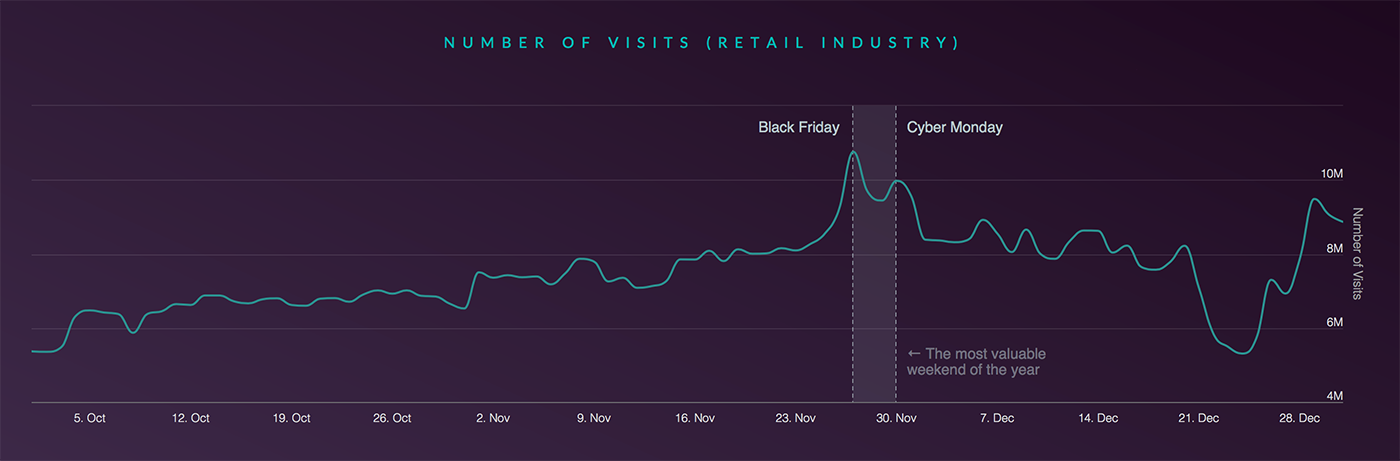
Apart from more visits to your website, you can also expect more customer service contacts. For example, businesses see up to 63% more chats from potential customers on Black Friday. Even more customers ask questions via chat on Cyber Monday: 80% more than during a normal day. How do all these extra visits and contacts convert into more sales? To answer that question, I polled online businesses and asked them what kind of changes in revenue they have observed over the years. As it turns out, ecommerce businesses score a 25% increase in Holiday Season revenue on average.
What customers expect from your online customer service
Increasing your revenue by a quarter is nothing to scoff at and it can easily make the November-December Holiday Season the most profitable part of the year. However, how do you deal with the increased demand without lowering service quality?
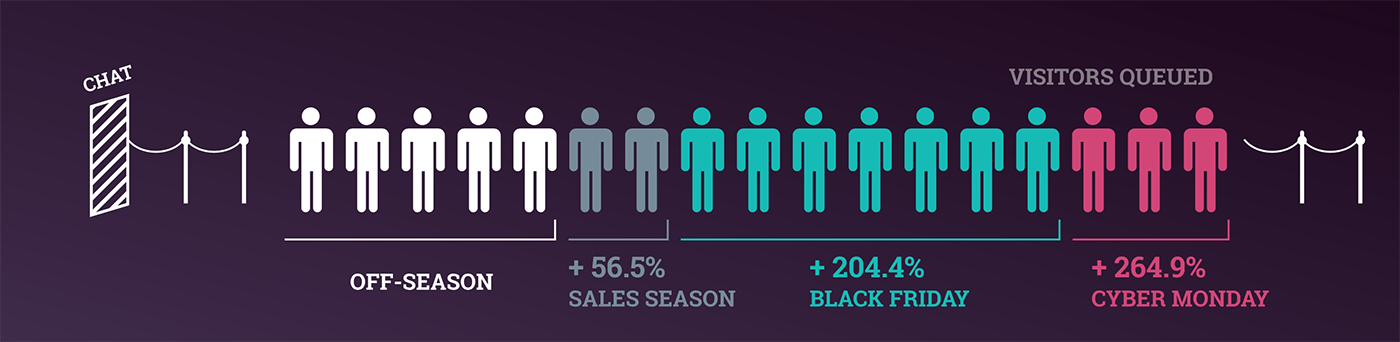
Overall, there’s a drop in the quality level of customer service over the course of the Holiday Season. For example, businesses are slower to respond to customer questions. They can take up to 10 seconds longer to answer a chat, which is a big increase considering that a typical customer waits around one minute for an online chat response. Additionally, more customers have to wait in a queue before getting an answer. All the extra chats lead to queues that are even 264% longer than during the off-season.
Despite these shortcomings, the customer satisfaction levels remain relatively unchanged. Last year’s Holiday Season shows that there’s only a slight dip in customer satisfaction: from 87.1% to 86.4% for the November-December period. It seems customers expect that things can go a little crazy during this period. If you prepare, this shouldn’t affect your sales. In the end, they are OK with customer service that is a bit slower, if they can get their issues resolved and complete their purchases.
How to get through the Holiday Season
The fact that customers understand that the Holiday Season is a busy period for all online businesses doesn’t give your business a free pass.You still need to do everything in your power to provide the best service possible and to maximize your chances of getting sales. Here’s how you can prepare for what’s to come in the next couple of weeks.
1. Seasonal Hiring
The first logical thing to do when faced with such a demanding period would be to get more agents online to handle all the extra customer service traffic. However, with the height of the season just a couple of weeks away, finding and training full-time agents is almost impossible. Thankfully, there’s the option of seasonal hiring.
Seasonal hiring allows you to bring extra pairs of hands to help with basic cases. The idea here is to find and hire a seasonal agent, give them a crash course about the tools you use and train them to help with the most popular/easiest cases. The more difficult questions can be passed on to more experienced full-time agents.
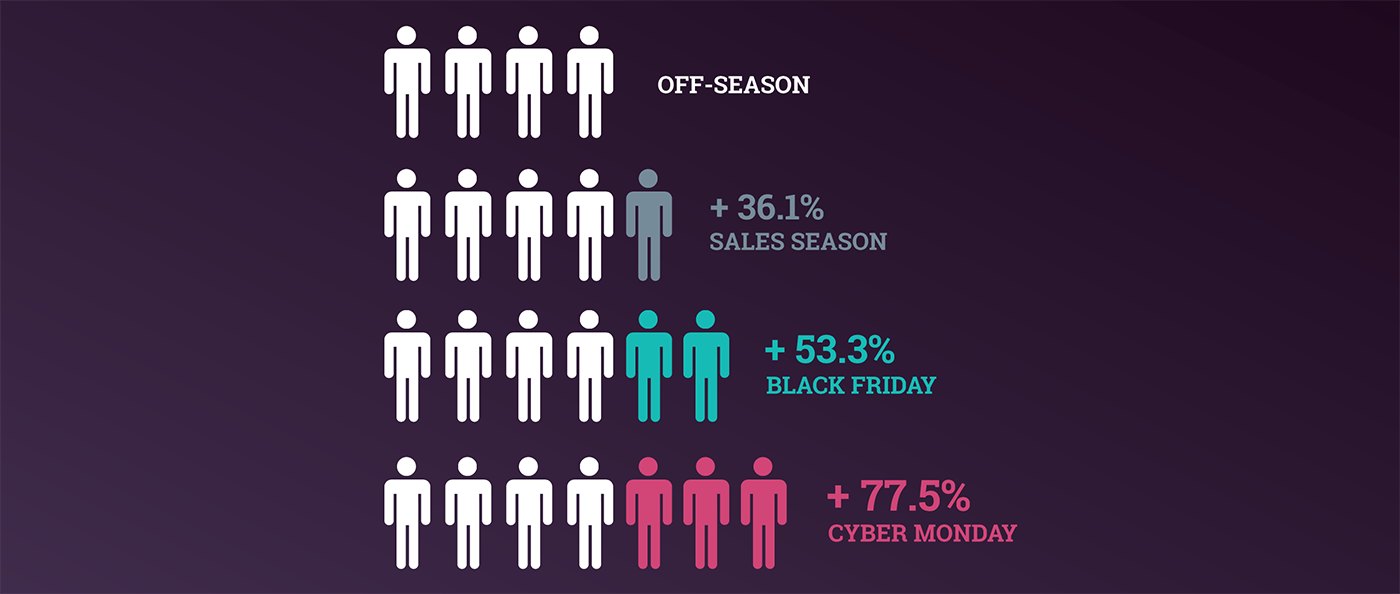
An average increase in the number of agents in the Holiday Season.
This method requires less training. Seasonal hires don’t need prior experience to give out basic information like telling customers what discounts are available or informing them about shipping options. This is not a perfect solution, but it can help you get over the biggest hurdles and significantly increase the number of customer service cases you’re able to take on. And once the season is over, you may also offer full-time positions to the most diligent seasonal agents.
2. Mobile Design Matters
I can’t stress enough how important the mobile design of your website is. People already buy via mobile more than on a desktop. If you ignore this huge market during the Holidays, you will lose on a lot of extra business.
There’s a few takes on how to improve your mobile design:
First, there’s responsive design. It’s an approach to designing websites that allows them to scale no matter the device a customer is using. Essentially, your website will look good regardless of the user’s device screen size. Customers access the same website, with the same URL address, no matter what device they use and their experience with your brand is a consistent one.
Secondly, there’s mobile subdomain. This is a version of your page prepared specifically for mobile devices. You get more freedom on how everything looks on mobile, so you can make it look better. However, you are essentially running two websites at once.
Finally, there are also mobile apps. More and more ecommerce websites create dedicated apps that customers can use to shop. These work best when it comes to encouraging impulse sales and stickiness, because mobile devices are always in the customer's pocket and your business can be accessed without even having to type in your website address.
No matter which method you pick, making sure that your mobile interface looks good and works well is an essential step you need to take when preparing for the Holiday Season.
A few aspects worth looking at when checking your mobile design include:
- Call-to-action: If you want to stimulate impulse buying decisions, the journey a customer takes to a purchase needs to be very simple. Each “next step” should always be clearly visible by providing the customer a clear call to action.
- Bandwidth limitations: Most customers won’t have access to Wi-Fi when accessing your mobile website so it needs to be relatively light. High-resolution graphics are a big no-no in this matter. Ideally, you want customers to reach your products quickly, uninterrupted, and without frustration.
- Space constraints: You won’t be able to cram all the information and product details on a small mobile screen. This is why you need to trim the product descriptions a bit and focus only on the most important benefits.
- Finger-friendly design: Since everything customers do on your mobile page will be done with their fingers, interface elements need to be big enough so that customers can access them with their finger tips. For example, you can’t have a tiny checkbox that’s almost impossible to press with a fingertip.
3. Longer Service Hours
If you’re not offering 24/7 customer service already, extending your service hours can be a good idea to get a bigger slice of the Holiday Season pie. This definitely eats up some additional resources and time, but the returns are worth it. If you decide to go for the longer office hours, make sure you target only the busiest days of the year. Look to your experiences from last year to check when -- and how many -- customers accessed your websites or tried to contact your business on which days.
There’s no point in increasing customer service coverage over the entire period as, on average, there’s a 2% increase in the number of contact requests during the full two months. Focus on the busiest days, which see 60-80% more requests. Four day weekends are sure-fire-bets: starting with Black Friday on the 25th of November, through the weekend of the 26th and 27th and ending on the 28th with Cyber Monday.
4. Open A Less Demanding Channel
Channels like email make answering the Holiday Season inquiries easier and can significantly increase the number of cases you handle, as opposed to phone.
Customers who contact you via email won’t expect an answer within minutes, so you get some leeway with first response time. It’s a lot more forgiving than phone where you need to answer in a more immediate nature. What’s more, email communication doesn’t happen in real time. This allows you to answer email cases in-between real-time calls. Whenever you get some downtime, you can go to your inbox to answer a couple of email questions. This will allow you to maximize the number of cases you’re able to handle without having to juggle a couple extra calls at the same time.
5. Make Sure Your Website Can Handle It
Getting as many people as possible to shop on your website is one thing, but you also need to make sure that the website can handle it. It’s especially important if you are planning on offering some amazing deals that can bring a lot of interest your way.
A sudden jump in the number of visitors can lead to a website crash and every minute of downtime is a minute you’re not making sales. Talk with your IT dept. or hire 3rd party experts to perform a stress test of your website and the most important e-commerce components: the shopping cart and your payment processing tools.
What methods do you use to prepare your business for the Holiday Season? Share this post with your tips and we’ll repost it on our social media channels!
BBB’s News and Opinion Blog serves as your source for business topics and industry news like tips on using Facebook Live for your small business and how to stop your seasonal business from going into hibernation. For more information you can trust, visit us at bbb.org/boston, like us on Facebook, or follow us on Twitter and Instagram.
About Jacob Firuta, LiveChat Content Manager
Jacob is responsible for preparing articles, reports and other materials that help companies create better customer service. You can read more of Jacob’s articles on the LiveChat Blog.