Health & Fitness
Check Your Canna for Disease, Now!
Canna virus threatens to wipe out all varieties of canna. Check your canna to see if they show signs of the virus.
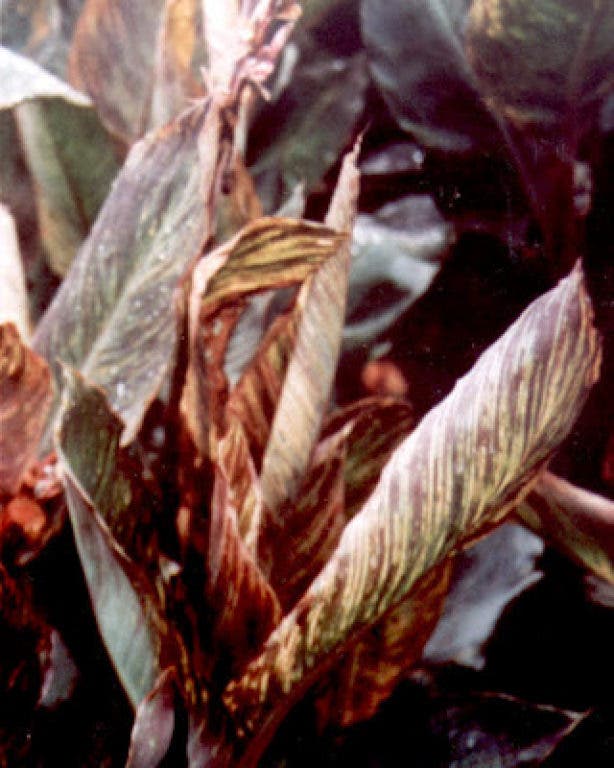


Here is a sobering thought: You may not be aware of this, but almost all canna you bought this year or plan to buy next year may have been infected by a serious virus. This was a relatively unknown virus a few years ago (@Y2005), but is now a worldwide epidemic.
If you have your own stock, that is, you dig up and store your canna rhizomes over the winter, then replant them the following spring, you may be okay. But don’t count on it. Almost all cannas sold this year, and the last few years, regardless of where you purchased them—big box, small box, most catalogs, garden centers, nurseries, etc., probably had the virus. And now you have it in your yard.
I do not know all of the wholesale growers, but at least two, Old House Gardens and Hart Canna, now only sell those canna varieties that they can “guarantee” are virus free. If your favorite outlet cannot guarantee that the canna is virus-free, don’t buy it.
Find out what's happening in Edinafor free with the latest updates from Patch.
So what is this virus? How can you recognize it? And what should you do about it?
What do diseased cannas look like? According to Hart Canna, “The initial symptoms are light green speckles on the leaves, and short light green streaks that are parallel with the leaf veins. As the year progresses, so it gets worse and worse, and the pale green streaks in the leaf become dead streaks. The plant looks very diseased. By the end of the year, all the leaves, even the new leaves, are distorted, twisted, and streaked with dead areas. You also get white streaks in the flowers.”
Find out what's happening in Edinafor free with the latest updates from Patch.
- Do all diseased cannas look the same? If you have planted the green canna varieties, you should easily see the virus. The virus is harder to spot in the darker bronze and variegated varieties.
- Be careful during inspection. Red spider mites, for example, can cause leaf browning, which at first glance may look like the virus. Leaf browning can sometimes be caused by poor quality compost or if you have transplanted the plants once they have started growing.
The virus may not kill the canna, but it can weaken them so if you dig them out in the fall to over-winter them, those rhizomes will continue to harbor the virus. Next year, you will have the virus again. It also appears that the virus can attack any variety—green, bronze, or striped. It may be spread by aphids. It could be
spread by your pruning tools. It may be spread when you touch a healthy canna
after touching one with the virus. Commercial growers grow acres of canna,
often crowded together, which are ideal conditions for spreading the virus, so
think twice about purchasing canna next year.
If you have a healthy stock of canna rhizomes, and are sure they are healthy, they should be okay to plant next year (again, if you overwinter them). The virus does not live in the soil, but in the rhizome itself.
So what should you do? Inspect your canna. Use the photos in this article as a starting point. Remove the infected plants by cutting them close to the soil line. Toss the plants into your curbside recycling container. Clean your cutting tool (pruners, knife) with a bleach solution (1:10) and/or in boiling water, though both methods may not be totally safe.
I raise my canna—‘Indica’, 'Ehemanii', and ‘Musifolia’—in containers and in my open garden. The canna planted in the containers will not contaminate the canna growing in the container next to it. The canna growing in the garden appears to be virus-free, for now.
I cut three of my plants from three different containers. All three have started to send up new shoots-leaves. I will monitor these new leaves for signs of the virus. If I see leaf browning, speckled or mottled patterns, etc., then out they go along with the rhizomes. I do not want to risk overwintering rhizomes that may have the virus.
Please check your canna, now!
Like Edina Patch on Facebook | Follow us on Twitter | Sign up for our daily newsletter