Schools
Keeping Kids Safe in a 1:1 World
BHS' Bob Cunha explains how the administration will control and monitor student iPad usage
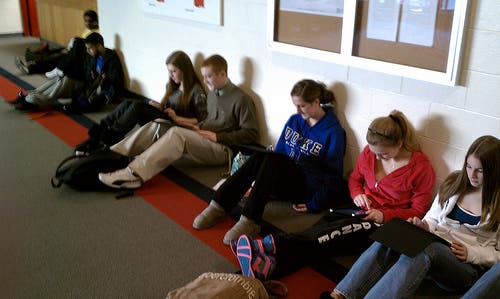
As Burlington students look forward to new iPads in September 2011, many parents are asking how their children will be protected from undesirable internet activity. Bob Cunha, System Administrator for Burlington Schools, sat down with Patch last week to explain the safety measures and controls that his department is working on to help insure that the 1:1 initiative doesn’t deliver more than parents bargained for.
First, Cunha pointed out that Burlington’s recent $1.5 million investment in infrastructure is what allows for this advancement. With 108 access points to the system, (BHS) is 100 percent covered for wireless access.
Cunha also commented that although iPads are sold as educational tools, the device was primarily designed for home use. This fact presents some challenges in terms of monitoring and controlling usage of the iPads. Cunha’s team has taken a three-pronged approach to the problem.
Find out what's happening in Burlingtonfor free with the latest updates from Patch.
The first line of defense, according to Cunha, is the system’s firewall.
“The firewall includes all our rules,” explained Cunha. “We have a white list of sites, such as Facebook, that we allow, and another list of sites that we do not allow.”
Find out what's happening in Burlingtonfor free with the latest updates from Patch.
Cunha added that the administration can make changes to those lists at any time. These controls apply to all internet traffic on the district network, independent of the type of device or user.
Through the firewall, the school department can block individual Web sites or categories of Web sites. For example, the firewall at BHS already blocks all sites with content rated 17+. Sometimes this capability presents problems of its own. For example, a student doing a research paper on breast cancer may find that most of the sites needed for the research are blocked due to the use of the word “breast.” Individuals can request and receive permission to visit such sites by applying to the system administrator for an exception.
The second layer of protection is a mobile device management (MDM) application called Casper. Using the Casper suite, the IT team will install a certificate policy on each iPad. The user must accept the certificate in order to use the device and it cannot be erased without voiding the acceptable use policy and informing Casper. Through the certificate, the administration can control individual devices. For example, the administration may decide to allow use of the iPad’s installed camera. If some parents decide they don’t want their children to have access to the camera, the administration can turn the cameras on those particular iPads off.
“We can change the certificates for all the iPads or for individual iPads,” said Cunha.
The last piece of the puzzle utilizes a system called LightSpeed. Lightspeed enables the school department to require each iPad to follow Burlington’ internet filters, no matter where the device is located at the time of use. The reason this is important is that students can access the internet from anywhere: home, internet cafes, airports. Most internet access points will not have the controls that are in place at BHS. LightSpeed basically insures that the restrictions of the school’s firewall follow the device wherever it goes.
However, Cunha stated that the administration is trying to be as open as possible, keeping restrictions to a minimum.
At a recent school committee meeting, Principal Patrick Larkin echoed this sentiment stating “Blocking students does them a disservice. They will not be as prepared for college.”
While the school department may strive for greater openness, it has not completely cut the apron strings. Administrators can send messages to individual devices. For example, if a student is missing from class, Cunha’s team can send a message to that individual’s iPad that says “Where are you? Get back to class!” The message pops up on the iPad screen where the student will see it if the device is turned on.
Cunha is careful to point out that it is impossible to completely eliminate inappropriate use. If students make poor choices and send inappropriate materials to one another, the system will not be able to block that activity. It will, however, catalog it and if the inappropriate behavior is brought to the attention of the administration, the activity can be tracked and the student will face consequences.
In addition, Cunha admits that as careful as we are, there will be some sites that get through the school’s protective layers, but over time, the system can be refined so that fewer and fewer negative elements can penetrate.
The School Department is still evaluating various categories of use and deciding what will be allowed. The chart below is subject to change, but is a current representation of what will most likely be blocked and allowed.
The BHS 1:1 implementation committee meets every Tuesday at 2:15 and all interested parties are welcome to attend. For more information on the school’s 1:1 initiative, click for an article featuring a conversation with Larkin and Superintendent Eric Conti and for an article featuring conversations with school department heads on their hopes and concerns for the initiative.
Category
Allowed or Blocked
Proxy sites
blocked
Games
allowed
Social Media Sites (Facebook, etc.)
allowed
Youtube
allowed
Gambling
blocked
Adult material
blocked
Drugs and drug paraphernalia
blocked
Military information
allowed
Hacking/cracking
blocked
News/current events
allowed
Jobs
allowed
Auctions
allowed
Banking/personal finance
allowed
Religion
allowed
Sports allowed Family Planning allowed Illegal or pirated software blocked Webmail allowed